
You have a Chase statement open and the numbers don't look like what your app showed last week. Here's how to read a Chase bank statement from the top down: confirm the period, check the summary math, then match each transaction list to its total. If you'd rather have a spreadsheet do the adding, you can convert your Chase statement to Excel and have the totals checked for you.
Quick answer: Start with the statement period printed near the top. Then check the summary: starting balance plus money in minus money out should equal the ending balance. Next, make sure each transaction list matches its own total. Finally, scan for fees and rows you don't recognize, and report any error to Chase before its deadline.
On this page
- What are the main parts of a Chase bank statement?
- How to read a Chase bank statement summary
- How do you read the transaction lists?
- Why doesn't my ending balance match my available balance?
- How do you check that a Chase statement adds up?
- What's different on a Chase credit card statement?
- What should you do if something on the statement is wrong?
- FAQ
- Related Chase guides
What are the main parts of a Chase bank statement?
A Chase checking statement covers one statement period. It shows where your balance started, where it ended and every completed transaction in between. Here is what each part tells you and what I check first when a client hands me one.
| Part | What it tells you | What to check |
|---|---|---|
| Bank and account details | Who issued the statement and which account it covers | The last four digits match the account you meant to pull |
| Statement period | The exact first and last day covered | It picks up the day after your previous statement ended |
| Balance summary | Starting balance, money in, money out and ending balance | The math works (see the next section) |
| Transaction lists | Completed deposits and withdrawals, each with a date, description and amount | Every list adds up to its own total |
| Fees and interest | Charges for the period, plus interest on accounts that earn it | Any fee you didn't expect |
| Check images | The front of each paid check, on image statements only | Payee and amount on each check |
| Bank contact details | How to reach Chase about the account | The number to call if something is wrong |
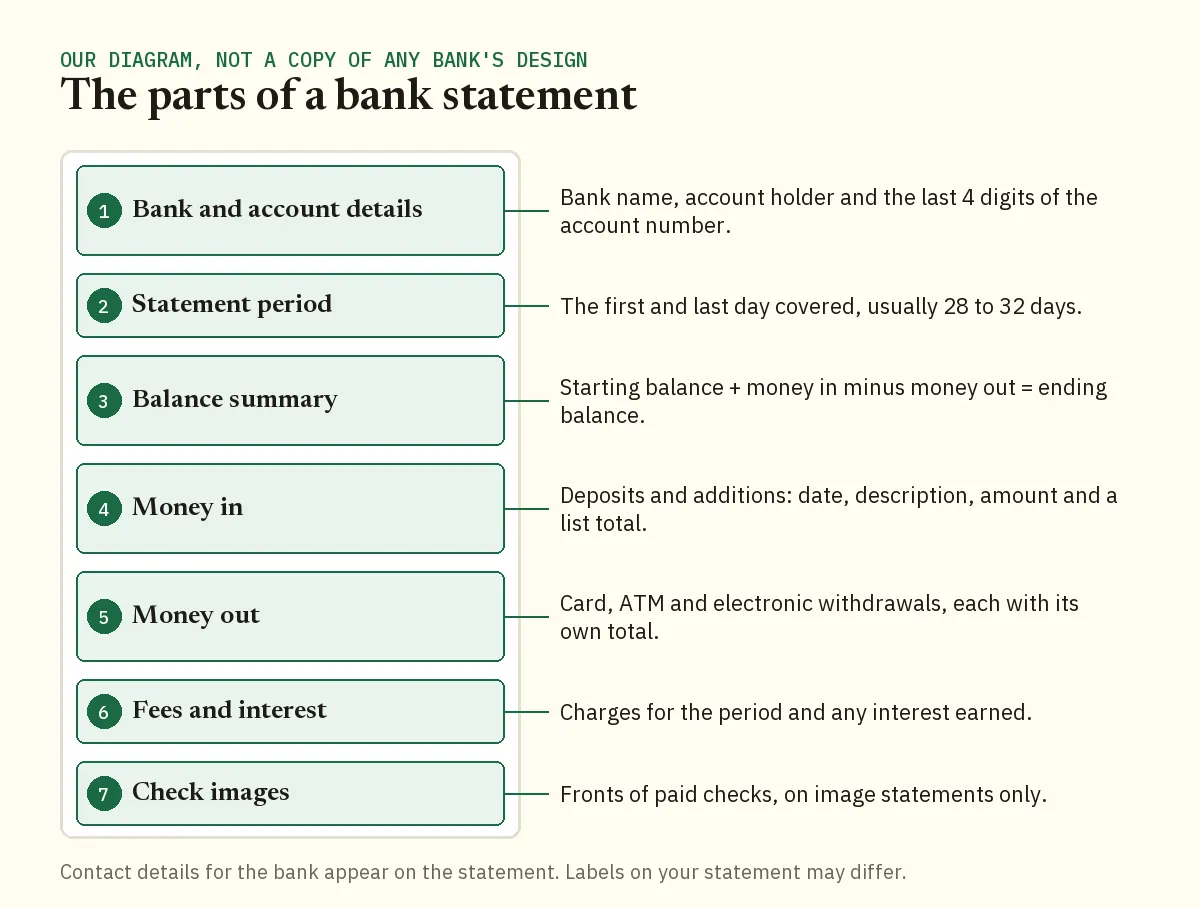
The headings on your own statement may not use these exact names. The examples below use our fictitious Demo Company LLC March statement, which groups its 12 rows under Deposits and Additions, ATM & Debit Card Withdrawals and Electronic Withdrawals.
Two Chase rules change how you read the page. A statement period runs 28 to 32 days, so it won't always match the calendar month. And accounts with a common owner can be combined on one statement, so check which account each block of rows belongs to before you total anything.
If the account earns interest, that line matters at tax time. Our guide to pulling interest from bank statements for your taxes shows how to total a year of it.
How to read a Chase bank statement summary
The summary is the whole month in a few numbers, and one rule ties them together: starting balance plus money in minus money out equals ending balance. Here's the demo statement for March 1 to March 31, 2026.
| Summary line (demo statement) | Amount |
|---|---|
| Beginning Balance | $4,210.55 |
| Deposits and Additions | $5,005.40 |
| ATM & Debit Card Withdrawals | -$367.37 |
| Electronic Withdrawals | -$2,767.99 |
| Ending Balance | $6,080.59 |
Worked example
- Add money in to the starting balance: $4,210.55 plus $5,005.40 is $9,215.95.
- Total money out: $367.37 plus $2,767.99 is $3,135.36.
- Subtract it: $9,215.95 minus $3,135.36 is $6,080.59.
- Compare with the printed ending balance. It's $6,080.59, so the month adds up.
The account grew by $1,870.04 in March. That one number is often all a client wants to know.
Most people skip the next check. Put this month's starting balance next to last month's ending balance. They should be identical. If they aren't, you're missing a statement or you've opened the wrong account.
How do you read the transaction lists?
Each list shows completed transactions only, and each one ends with a total that should match a line in the summary. On the demo, Deposits and Additions has four rows: two Stripe transfers, a remote online deposit and a Zelle payment. They come to $5,005.40, the same figure the summary shows.
Dates
Rows on our demo statement carry a month and day such as 03/11, with no year. When a date has no year, take it from the statement period. On a period that runs from late December into January, that matters.
On the demo, a card row dated 03/11 reads "Card Purchase 03/10 Adobe Creative Cloud". On our demo, the date inside the description is the day the card was used and the date column is the day it posted. If your statement shows two dates like this, match receipts to the one in the description.
Order on the page
Our demo groups rows by type, so the page doesn't run in date order from top to bottom. The March 5 payroll of $2,100.00 sits under Electronic Withdrawals, below card purchases from later in the month. There's no balance printed next to each row either, so you can't follow the balance down the page.
Common mistake: counting the month twice
I see this every tax season. Someone adds every number on the page, including the section totals. The totals already repeat the rows, so March's money in comes out at $10,010.80 instead of $5,005.40. The fix is to use either the individual rows or the totals, never both.
Why doesn't my ending balance match my available balance?
They measure different things at different moments. The ending balance is fixed on the last day of the statement period. Your available balance is live, and Chase works it out from the previous end of day balance:
- plus any pending credits,
- minus pending debits and any holds,
- minus deposits that aren't available to withdraw yet.
Pending items aren't on the statement. Say you pay a $38.00 bill on the last day of the period. It lowers your available balance right away, but it may only appear on next month's statement once it posts.
The order Chase posts transactions
Chase's deposit account agreement sets out its nightly posting order for checking and savings accounts. This helps when you're working out which payment pushed a balance below zero.
- Adjustments from the previous day and deposits go on first.
- Withdrawals follow in time order, by when each was authorized or shown as pending. Items with the same date and time go largest first.
- Next come items Chase can't process automatically, such as Overdraft Protection transfers. These also go largest first.
- Fees are charged last.
How do you check that a Chase statement adds up?
Check it in two passes: the summary math above, then every row against its list total. Doing that by hand on a long statement takes a while, which is why I put statements into a spreadsheet first.
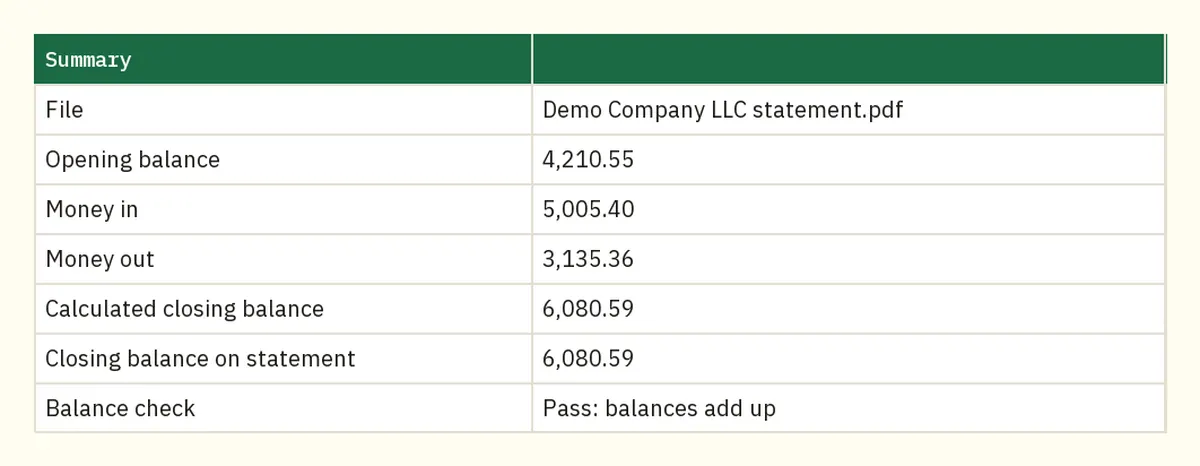
Our bank statement converter does both passes. It checks that opening plus money in minus money out equals the printed closing balance. The Excel file has columns for Money in, Money out and Balance, plus the statement section and page of each row. A Summary sheet puts the calculated closing balance next to the printed one and marks the month pass or fail.
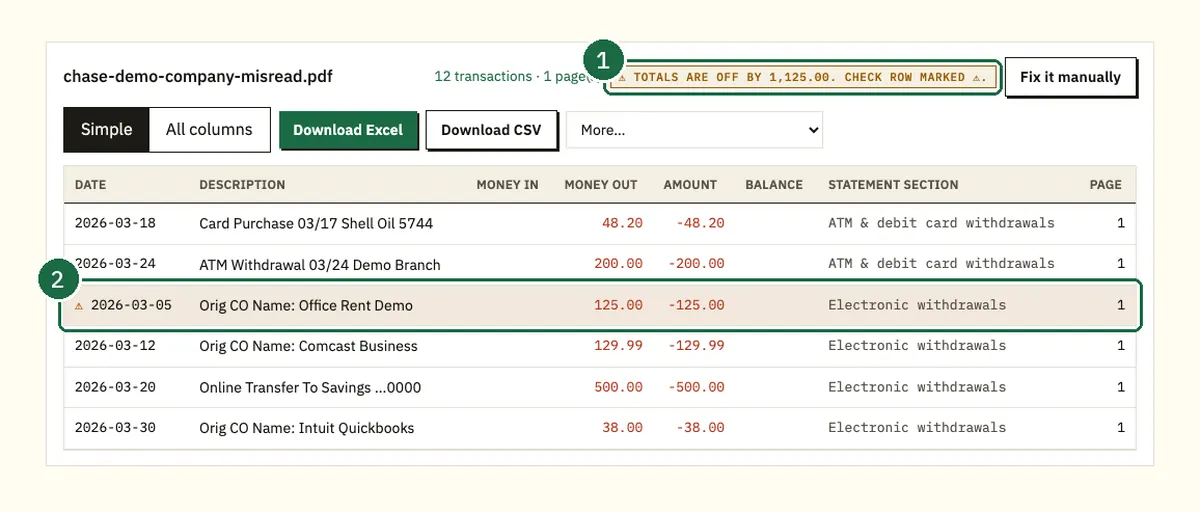
If the totals don't match, you see by how much, and the row most likely to blame is marked. In our misread sample, an Office Rent payment of 1,250.00 was read as 125.00, so the totals were off by exactly 1,125.00. Compare that row with the PDF and correct it.
Worked example: the $2,000 daily balance test
Chase Business Complete Checking has a $15 Monthly Service Fee. One way to avoid it is a daily ending balance of at least $2,000 on every business day of the statement period, not counting the last day. You can't see that from the summary, so sort every row by date and read the Balance column.
On the demo, the lowest point comes right after the $2,100.00 payroll on March 5, at $3,886.37. That clears $2,000 with room to spare. Had payroll been $4,000.00, that day would have ended at $1,986.37 and missed the test.
What's different on a Chase credit card statement?
A card statement tracks what you owe, not what you hold, so read the balance as debt. Chase's guide to reading a credit card statement splits it into a summary area and a detailed area.
- Summary area: the statement balance and your available credit, the minimum payment due and rewards points. It also has the minimum payment warning, a chart of how long minimum payments alone would take to clear the balance.
- Detailed area: the previous balance and any notice of changes to your terms. Then come interest charges by type and fees. Last are recent transactions, including any by authorized users, and your credit limit.
Don't mix up the credit limit and available credit. The limit is the most you can owe, and available credit is what's left after your current balance. Chase says statements usually arrive about 21 days before your next minimum payment is due.
What should you do if something on the statement is wrong?
Call Chase as soon as you spot it, because the clock starts when the statement is sent. For a personal account, an electronic transfer you didn't make must be reported within 60 days of the first statement that shows it. The CFPB explains what happens if you report an unauthorized transfer late.
Other deadlines in the agreement are shorter. You have 30 days for other statement errors or a statement that never arrived. Business accounts get 30 days for electronic transfers too. Have your name, account number, the transaction description and the amount ready when you call.
FAQ
Why isn't a payment I made on my Chase statement?
Statements list completed transactions only. A payment still pending when the period closed will show up on the next statement once it posts.
Is my online activity list the same as a statement?
No. Chase calls the monthly statement the official record of your account, and its alerts don't replace it. Keep the PDF statement for your records.
Why does my statement start in the middle of the month?
Chase statement periods usually run 28 to 32 days, so they don't always follow the calendar. Chase Business Complete Checking periods end on the last business day of each month.
Where are the pictures of my checks?
With an image statement, the front of each paid check appears on the statement. With check safekeeping, the images aren't included, but you can view them in Chase's online banking.
Can I use a Chase statement for a mortgage application?
Yes, lenders usually ask for recent bank statements. See what lenders check on Chase statements for a mortgage before you send them.
Related Chase guides
Not affiliated with JPMorgan Chase. Chase is a trademark of its owner.