
Your accountant wants every Chase statement from last year, or a lender asked for the latest two, and you need the PDFs on your computer today. This guide shows how to download Chase statement PDFs from the website and the app, plus how to grab a whole year without losing track. Once the files are saved, you can convert your Chase statement to Excel if the numbers need to go into a spreadsheet.
Quick answer: On chase.com, click the Main Menu symbol in the top left corner and choose Statements & documents. Pick the account and the year, then click the Open or Save icon next to the statement. In the Chase Mobile app, tap Profile & Settings, then Statements & documents under Document manager.
On this page
- How to download Chase statement PDFs on the website
- How do you download Chase statements in the app?
- How do you download Chase business statements?
- How do you download a full year of Chase statements?
- Should you download the statement or the transactions?
- Why can't you find a Chase statement?
- How do you get a Chase statement that isn't online?
- FAQ
- Related Chase guides
How to download Chase statement PDFs on the website
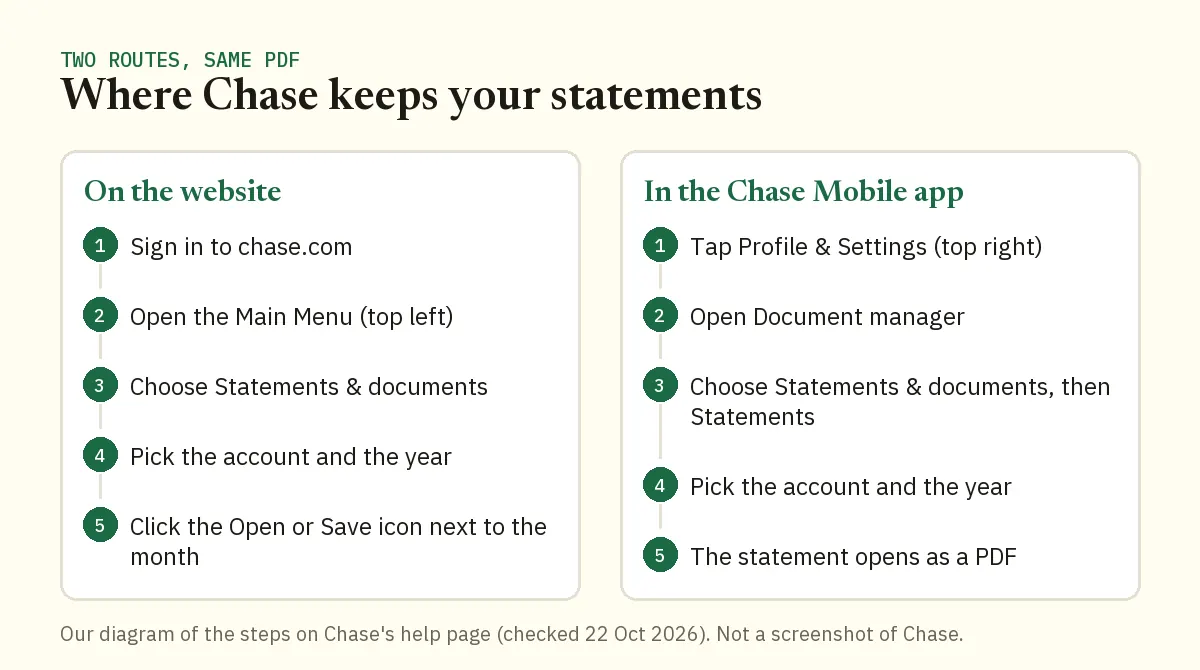
Use a computer, sign in at chase.com and go to Statements & documents. That one page holds the statements for your Chase accounts, sorted by account and year.
- Sign in at chase.com.
- Click the Main Menu symbol in the top left corner of your dashboard.
- Choose Statements & documents.
- Select the account, then the year.
- Click the Open or Save icon to the right of the statement you want.
Use Open when you want to check the dates before you keep the file. Use Save when you already know it's the right month. Those steps come straight from Chase's paperless statements page, so they're the route Chase itself describes.
Get the account right before the year
If you have more than one Chase account, the account you select decides which statements you see. This is the step people rush. Before you send anything, look at the last four digits of the account number printed on the PDF and make sure they match the account you were asked for.
A checking statement sent in place of savings is the most common mix-up. It costs a day of back and forth with a lender, and it takes five seconds to prevent.
How do you download Chase statements in the app?
In the Chase Mobile app, statements sit inside Document manager, which you reach from the Profile & Settings icon in the top right corner.
- Open the Chase Mobile app and sign in.
- Tap the Profile & Settings icon in the top right corner.
- Under Document manager, choose Statements & documents.
- Tap Statements and select your account.
- Choose the year and then the statement. It opens as a PDF.
How you get that PDF off the phone depends on your phone and your app version. For a quick look at one month, the app is fine. For a batch of files going to an accountant, the website is faster because every file lands in a folder you can attach from.
How do you download Chase business statements?
Business accounts use Chase Business Online, where statements sit under a Statements link below your dashboard. Chase's business support pages describe the route like this:
- Sign in to Chase Business Online.
- Choose your account.
- Click Statements below your dashboard.
- Filter by year with the dropdown menu.
- Open or download a statement with the icons on the right.
To switch to another business account, choose it under Accounts on the left. Up to seven years of statements show there. If you keep the books for several companies, do one company at a time so the files never mix.
How do you download a full year of Chase statements?
Save them one at a time from Statements & documents and rename each file as it arrives. Chase's help pages don't describe a bulk download, so plan on twelve saves per account. With a naming habit, a year takes about ten minutes.
A file name that sorts itself
Start every name with the year and month, then the bank, account type and last four digits. For example: 2025-03 Chase Checking 4410.pdf. Sorted by name, the folder reads in date order with no extra work.
Time-saving tip: set your browser to ask where to save each download. Then every statement goes straight into the right folder, and you rename it in the same dialog.
Keep one folder per account per year. When a lender asks for the two most recent statements, you'll find them without opening a single PDF.
Worked example: Demo Company LLC's 2025 records
Say Demo Company LLC has one Chase checking account, and its bookkeeper needs January to December 2025 for the tax return.
- In Chase Business Online, choose the checking account, click Statements and filter the year to 2025.
- Save each of the 12 statements and rename it straight away, from 2025-01 to 2025-12.
- Open each PDF and note the first and last date of the statement period. Chase periods don't always line up with calendar months, and your bookkeeper will want to know where each file starts.
- Spot check one month. The March statement shows 12 transactions, and its ending balance should equal the starting balance on the April statement.
- Put the folder in the bookkeeper's portal or zip it and send it.
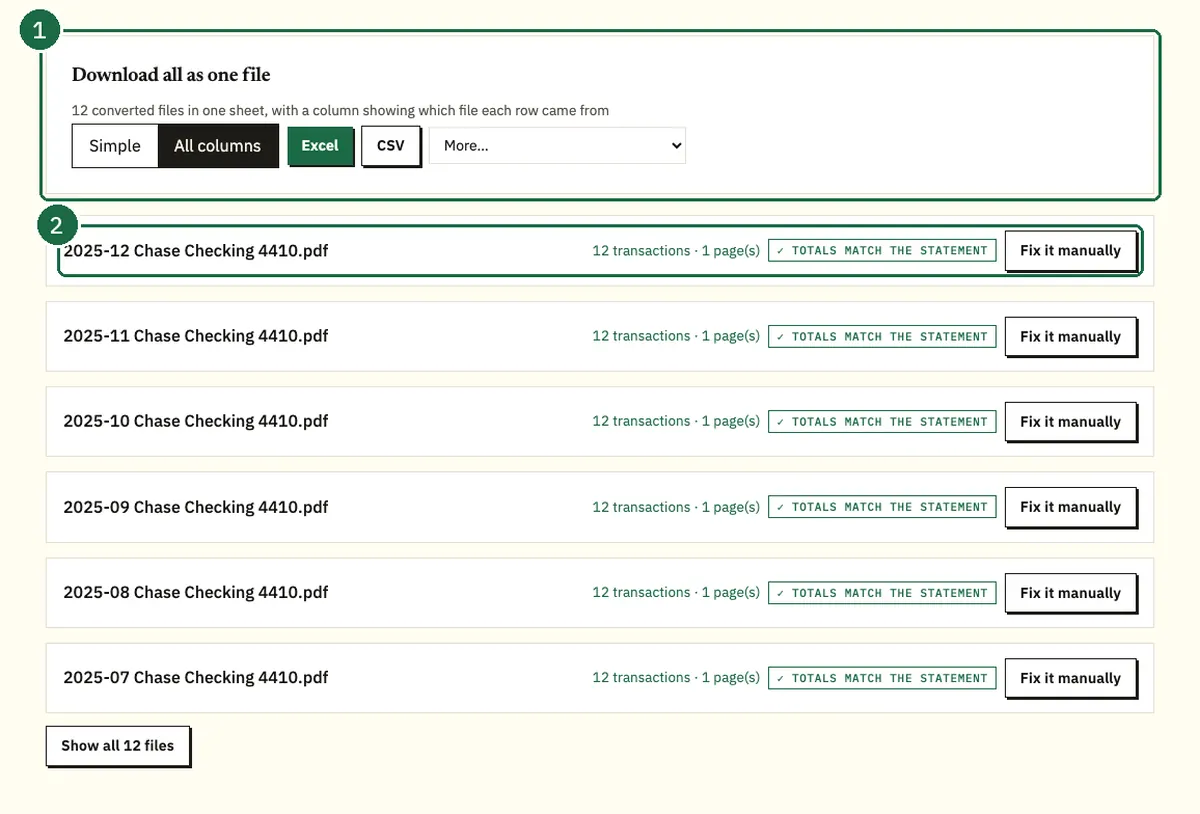
That balance check in step 4 is the fastest way to catch a gap. If one month's ending balance doesn't match the next month's starting balance, you've skipped a statement or saved the same one twice.
Should you download the statement or the transactions?
Download the statement when someone needs an official record, and download transactions when you only need recent numbers in a spreadsheet. Chase's deposit account agreement calls the monthly statement the official record of your account. Chase says alerts don't replace it, and a screenshot of your activity screen won't either.
| Statement PDF | Transaction download | Screenshot of activity | |
|---|---|---|---|
| What you get | The monthly statement Chase issued | Activity for dates you choose | A picture of your screen |
| Official record | Yes | No | No |
| How far back | Up to 7 years, by account type | About the last two years on a computer | Whatever is on screen |
| File types | CSV, QFX, QIF or QBO | Image | |
| Best for | Lenders, accountants and tax files | Budgeting and quick bookkeeping | Nothing you need to hand in |
Our comparison of the Chase CSV export and the PDF statement explains when each one is the better pick.
Why can't you find a Chase statement?
It's almost always one of five things:
- The wrong account is selected.
- The month you expect doesn't match the statement period.
- The statement isn't out yet.
- The account is printed on another account's statement.
- It's older than what Chase shows online.
Common mistake: searching by calendar month
People look for "the March statement" and can't find one that covers March 1 to 31. On a personal account, the period runs 28 to 32 days and may start partway through a month.
The fix: open the statements on either side and read the period dates on each. The transactions you want are on whichever statement's dates cover them, even if the label isn't the month you expected.
This month's statement isn't there yet
If you're paperless, Chase notifies you when each new statement is available. Until that notice arrives, recent activity shows on your account page, and that page isn't a statement.
Your savings account is on the checking statement
Chase can combine checking, savings and CD accounts that share at least one owner on a single statement. If a savings statement seems to be missing, open the checking statement for the same month and look further down.
You can ask Chase to separate them, but that only changes future statements. Older months stay combined, so tell your accountant which pages belong to which account.
The statement is more than 7 years old
Chase keeps up to 7 years of statements online, depending on the account type. For anything older, our guide on how far back Chase keeps statements covers what's online and how to request copies.
How do you get a Chase statement that isn't online?
Call Chase and ask for a copy. Under Chase's deposit account agreement, each owner of each account listed on a statement can request one. The numbers below are on Chase's customer service page and its business contact page.
- Personal accounts: 1-800-935-9935
- Business accounts: 1-800-242-7338
Have the account number and the statement months ready before you call. If only one owner is on the phone, that's fine, because each listed owner can ask on their own.
FAQ
Can I download a Chase statement as an Excel file?
No, Chase statements come as PDFs. You can export recent transactions from Spending Planner as a CSV file, or convert the statement PDF to get a spreadsheet that matches the statement period.
Can I download Chase statements on my phone?
Yes. In the Chase Mobile app, tap Profile & Settings and open Statements & documents under Document manager. Pick the account and year, and the statement opens as a PDF.
How far back can I download Chase statements?
Up to 7 years, depending on the account type. For older months, each owner on the account can ask Chase for a copy.
Does Chase charge for statement copies?
We found no charge for statement copies in Chase's personal fee schedule effective June 2026. If you want a copy mailed, ask about fees when you call.
How often should I download my Chase statements?
Once a year is enough for most people. Every January, save the previous year's 12 statements so nothing ages out of the online window before you need it.
Do these steps work for Chase business accounts?
Not exactly. Business statements are in Chase Business Online: choose the account, click Statements below your dashboard, filter by year and use the icons on the right to open or download.
Related Chase guides
- How far back you can get Chase statements
- Chase CSV export vs PDF statement
- How to read a Chase bank statement
Not affiliated with JPMorgan Chase. Chase is a trademark of its owner.