
You need a Chase statement from years ago for a tax question, a loan file or an old dispute, and you're not sure it still exists. Here's how far back Chase statements go online and what to do when the one you need is older. Once you have the PDFs, you can convert your Chase statement to Excel to total or search years of activity.
Quick answer: Chase shows up to 7 years of statements online, depending on the account type. You'll find them under Statements & documents on chase.com or in the app's Document manager. For anything older, an owner on the account can call Chase for a copy. Transaction downloads only reach back about two years.
On this page
- How far back can you get Chase statements online?
- How far back Chase statements go, by account type
- What does a 7-year window look like on a calendar?
- How do you get Chase statements older than what's online?
- How far back do Chase transaction downloads go?
- How far back do you actually need Chase statements?
- How do you keep Chase statements longer than 7 years?
- FAQ
- Related Chase guides
How far back can you get Chase statements online?
Up to 7 years. That's the figure on Chase's paperless statements page, with one condition: it depends on your account type. So 7 years is the ceiling, not a promise for every account.
The quickest way to see your own limit is to look. Open Statements & documents, pick the account and check the oldest year in the list. If you haven't done this before, our walkthrough on downloading Chase statements on the website or app shows each click.
A newer account simply has less history. If you opened your checking account in 2023, 2023 is as far back as it goes, whatever the limit says.
How far back Chase statements go, by account type
Chase publishes one ceiling of up to 7 years. Its personal, card and business pages all repeat it. Here's how that plays out by account.
| Account | What Chase's pages say | What to do |
|---|---|---|
| Checking and savings | A monthly statement each period, generally available online, up to 7 years depending on account type | Check the oldest year in Statements & documents |
| United credit card | Up to 7 years of statements online | Same place, select the card |
| Other credit cards | Up to 7 years, depending on account type | Check the year list for that card |
| Business accounts | Up to seven years in Chase Business Online | Click Statements below your dashboard and filter by year |
Because the limit depends on account type, treat the year list in your own login as the final word. It shows exactly what your account still holds.
What does a 7-year window look like on a calendar?
In October 2026, a full 7-year window starts around late 2019. Anything before that is past the online limit, even on an account that shows the maximum.
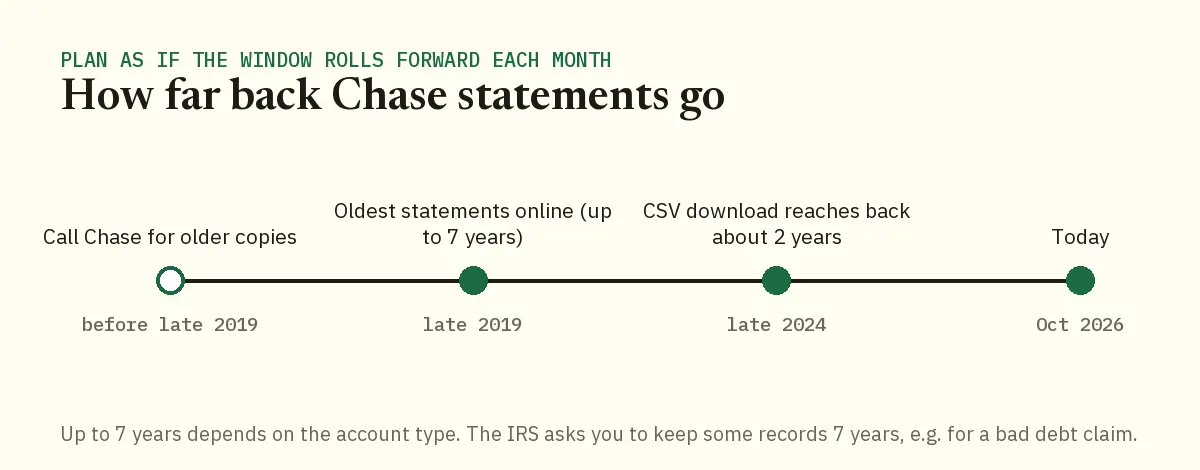
Plan as if the window moves forward every month. The oldest statement you can see today is the one most likely to be gone next time you look.
Worked example: Demo Company LLC needs 2019
Demo Company LLC's accountant is preparing a bad debt claim in October 2026 and asks for every Chase checking statement from January 2019 onward. The IRS says to keep records for 7 years when you claim a bad debt deduction, so the request makes sense.
- In Chase Business Online, choose the checking account, click Statements and open the year dropdown to see the oldest year offered.
- Download everything that's still there. In this example, the list starts in late 2019, so the bookkeeper saves those months first.
- Write down the gap: January to roughly September 2019, about nine statements.
- Call Chase business support at 1-800-242-7338 and request copies of those months.
- When the copies arrive, check that each one's ending balance matches the next statement's starting balance. If they chain, no month is missing.
Saving what's online first matters more than it looks. If the call takes a few weeks to sort out, the oldest online month could drop off while you wait.
How do you get Chase statements older than what's online?
Ask Chase for a copy. Chase's deposit account agreement says each owner of each account listed on a statement can request one.
- Personal accounts: 1-800-935-9935
- Business accounts: 1-800-242-7338
Both numbers are listed on Chase's customer service page and its business contact page. Before you call, have the account number ready and list the exact months you need. A short list of statement periods gets a faster answer than "everything from 2018".
On cost, Chase's personal fee schedule effective June 2026 doesn't list a fee for statement copies. Ask on the call anyway, especially for business accounts or a large batch.
Is there a hard limit on old copies?
Chase's agreement says it follows federal and state record retention laws and may dispose of records once the period those laws set has passed. Very old statements may no longer exist, so ask before you promise anyone a copy.
About to close an account?
Download every statement before you close it. Once the account is gone, getting a copy means a phone call, and a few minutes of saving now avoids that.
How far back do Chase transaction downloads go?
About two years, which is much shorter than statement history. Chase's Spending Planner on the website exports transactions as CSV, QFX, QIF or QBO files for the last two years. In the app, it offers a PDF of transactions for the last calendar year.
So if you need 2021 in a spreadsheet, the export won't reach it. Download the 2021 statements and work from those instead.
Common mistake: assuming the export covers everything
A client pulls a CSV of "all transactions", sees it starts two years ago and thinks the older history is gone. It isn't. The statements behind it still go back up to 7 years.
The fix: use the export for recent months only. For anything older, download the statement PDFs and convert them, so every month comes with its own starting and ending balance to check against.
How far back do you actually need Chase statements?
For most tax purposes, 3 years. The IRS ties record keeping to the period of limitations for each return, and some situations call for longer.
| Situation | How long the IRS says to keep records |
|---|---|
| Most returns | 3 years |
| You didn't report income worth more than 25% of the gross income on your return | 6 years |
| You claimed a loss from worthless securities or a bad debt deduction | 7 years |
| You didn't file a return, or filed a fraudulent one | Indefinitely |
| Employment tax records | At least 4 years after the tax is due or paid, whichever is later |
The source is the IRS page on how long to keep tax records. Our guide to getting bank statements ready for your tax return covers which statements to pull for a filing. A divorce or separation is different: courts usually ask for the last 12 months of every account, and our guide to bank statements for divorce lists what each court expects.
Notice the 7-year line. It sits right at the edge of Chase's online window, so by the time a question comes up, the month you need may already be gone. That's the case for keeping your own copies.
A loan application usually looks back far less. The CFPB's list of documents for a mortgage application includes the two most recent bank statements. Our guide to Chase statements for a mortgage application covers what lenders check on them.
How do you keep Chase statements longer than 7 years?
Save your own copies once a year. Chase's online history is a convenience, not an archive, and the oldest year keeps moving.
- Each January, open Statements & documents for every account.
- Save the previous year's statements into one folder per account per year.
- Name each file by year and month so the folder sorts itself.
- Back the folder up somewhere other than your laptop.
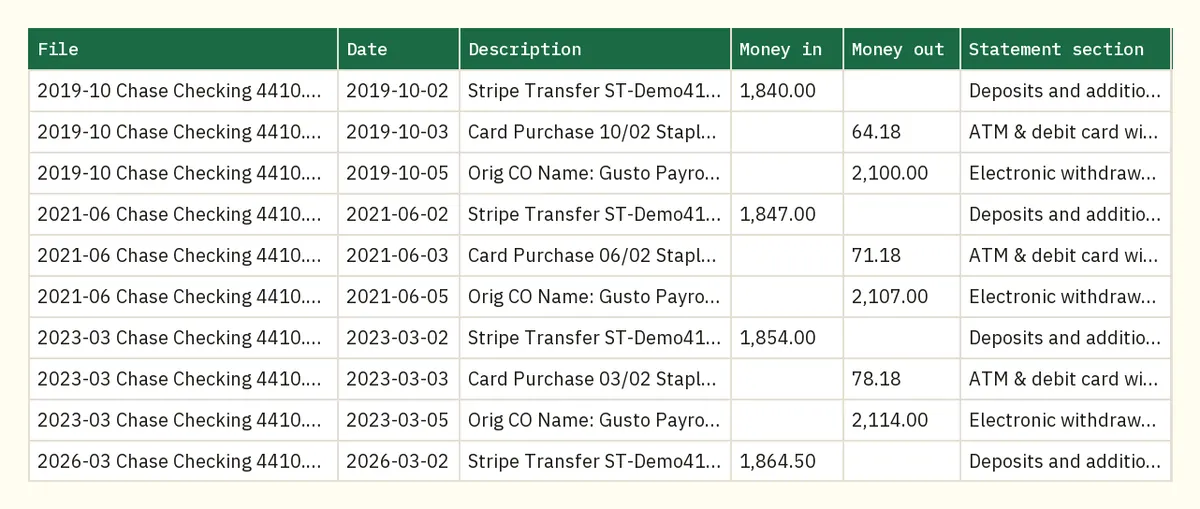
Twelve files per account a year is a small job. Rebuilding a missing year from phone calls is a big one.
FAQ
Can I get Chase statements older than 7 years?
Not online. Call Chase and ask for copies, at 1-800-935-9935 for personal accounts or 1-800-242-7338 for business. Chase may no longer hold very old records, so ask before you count on them.
Why does my account show fewer than 7 years?
Either the account is younger than 7 years or its account type has a shorter history online. Chase's 7-year figure is a maximum that depends on the account type.
How far back do Chase credit card statements go?
Up to 7 years online, depending on the card. Chase's United Card page gives the same 7-year figure. Check the oldest year shown for your card in Statements & documents.
Does Chase charge for old statements?
Chase's personal fee schedule effective June 2026 lists no fee for statement copies. Ask on the call before a large request, especially for a business account.
How long should I keep my Chase statements?
At least 3 years for most tax purposes, and 7 if you claim a bad debt or a loss from worthless securities. Keeping your own copies covers you when Chase's online window has moved on.
Related Chase guides
- How to download Chase bank statements
- Which Chase statements a mortgage lender wants
- Chase CSV export or PDF statement
Not affiliated with JPMorgan Chase. Chase is a trademark of its owner.