
To get a Citi credit card statement to Excel, download the statement PDF from Citi Online and run it through a converter that reads card statements. Then check that the rows add up to the new balance before you trust the sheet. You can convert your Citi statement to Excel free, and the whole job takes a few minutes per statement.
Quick answer: Download the statement PDF from Citi Online. Upload it to a card statement converter and check the totals: previous balance plus the rows should equal the new balance. If they match, download the Excel file. Then sort by date or description and add a category column for your own totals.
On this page
- How to convert a Citi credit card statement to Excel
- What a Citi card statement holds, and which parts become rows
- Sale date or post date: which one should you use?
- Why purchases and payments have opposite signs
- Can you download Citi card transactions straight to Excel?
- How to clean up the sheet in Excel
- What to do when the totals don't match
- FAQ
- Related Citi guides
How to convert a Citi credit card statement to Excel
Four steps. We'll use our demo statement for Roshan Demo LLC throughout, a card ending 4242 with a billing period of 02/26/26 to 03/26/26. It has 13 rows with Sale Date and Post Date columns.
Step 1: Get the statement PDF from Citi
Sign in to Citi Online and open your card's statements. Citi's own how-to guide for card customers says to click the Statements (PDF) link, pick a date under Recent Statements and click Download. That guide dates from 2016 and 2017, so the menu names may have changed. Check the menu in your own Citi Online account if they don't match.
Older months work a little differently. In the same guide, statements that aren't listed are requested under Older Statements and can take 48 to 72 hours. Once ready, they stay available for 7 days only, so save them as soon as they arrive. Our guide to downloading your Citi statement PDF covers the website and the app step by step.
Step 2: Upload the PDF to the converter
Open the bank statement converter and drop the PDF onto the upload box. You can add several statements at once. They come back as one spreadsheet with a column showing which file each row came from.
If a PDF has a password, the converter asks for it once and doesn't store it. A scanned paper statement also works, read with text recognition, but the result is less exact than a downloaded PDF. Most statements take under a minute.
Step 3: Check the totals
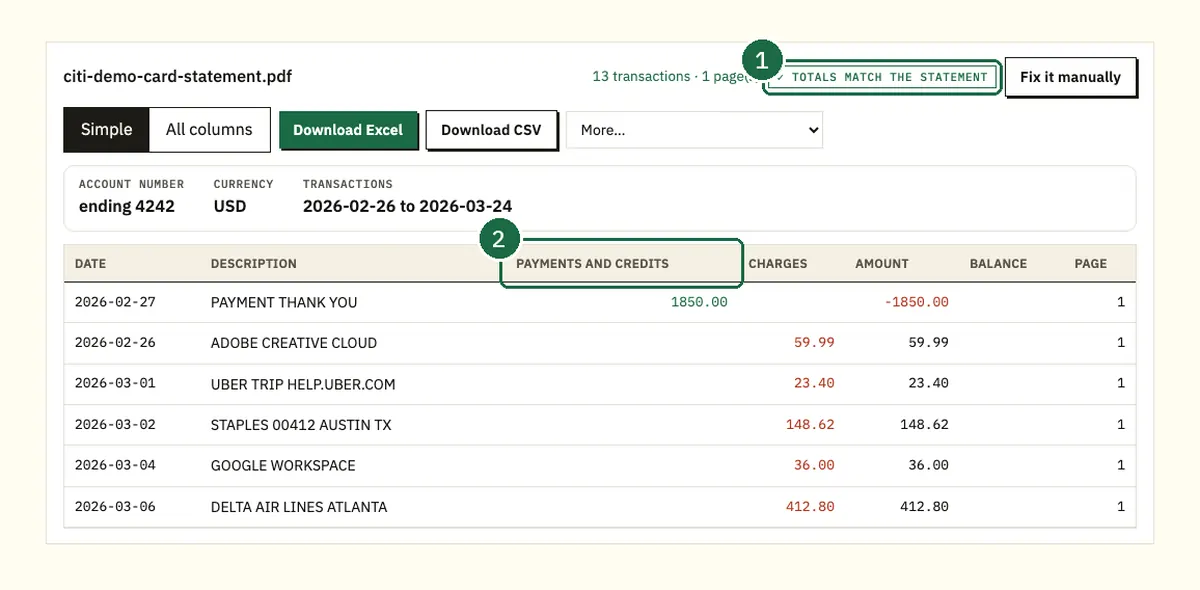
This is the step most guides skip. A card statement prints a summary at the top. It starts with the previous balance and ends with the new balance. Payments and credits, purchases, fees and interest sit in between. The converter adds up every row it read and compares the result with those printed numbers.
On the demo statement the math looks like this:
| Line | Amount |
|---|---|
| Previous balance | $1,850.00 |
| Payment (PAYMENT THANK YOU) | -$1,850.00 |
| Credit (Staples return) | -$32.18 |
| Purchases (11 rows) | $1,215.18 |
| Total of the 13 rows | -$667.00 |
| New balance ($1,850.00 + -$667.00) | $1,183.00 |
The result equals the new balance printed on the statement, so the preview shows "Totals match the statement". That tells you no row was dropped, doubled or misread.
Step 4: Download the Excel file
Click Excel to download a .xlsx workbook. CSV is free too. QuickBooks (.qbo), OFX and QIF files sit under More on paid plans. The free tier covers 3 pages a day without an account and 15 a day with a free account, and no card is needed.
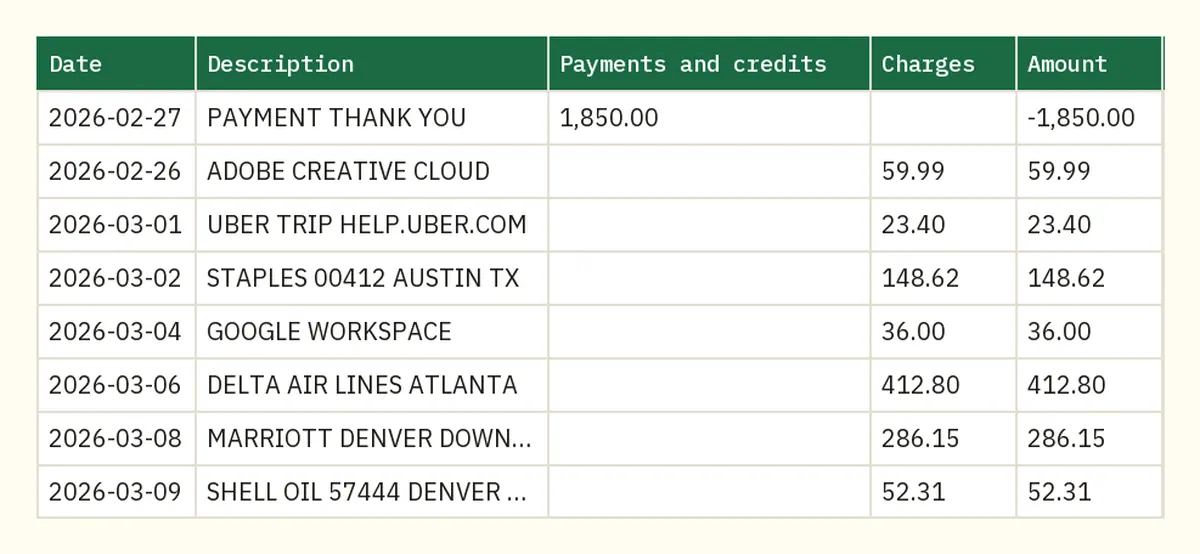
The main columns are Date and Description, then Payments and credits, Charges and Amount. It also has Account number, Currency and Page so you can trace any row back to the PDF.
What a Citi card statement holds, and which parts become rows
Citi's guide to reading a credit card statement lists the parts. You get account details and an account activity summary. Then come payment information and the transactions. After that you'll see interest charges and fees with year-to-date totals, plus a reward summary on rewards cards.
Only the transactions become rows in your sheet. Citi says that list shows each purchase with the merchant name, purchase date, posted date and amount. Payments, credits and interest charges are listed with similar details.
The summary at the top isn't a row. It's the answer key you check the rows against in Step 3.
Citi also says a billing cycle typically lasts 28 to 31 days and ends on the closing date. So each statement covers about a month. A statement lists posted transactions up to the closing date, and anything still pending shows up on a later one.
Sale date or post date: which one should you use?
Each charge on a Citi card statement carries two dates. The sale date (Citi calls it the purchase date) is when you bought something. The post date is when the charge reached your account. On the demo they're a day or two apart.
The Adobe charge has a sale date of 02/26 and a post date of 02/28. Delta Air Lines shows 03/06 and 03/07.
Which one matters depends on the job:
- For expense reports and budgets, use the sale date. It matches the receipt.
- For matching your card balance or reconciling in accounting software, the post date is the safer choice. It's when the charge counted toward the balance.
Watch the edges of the billing period. A purchase made on the last day of one cycle can post in the next one. If a receipt seems to be missing, check next month's statement before you assume it's lost.
Our sheet keeps one date per row. On our demo statement that is the first date printed, the sale date. The payment made on 02/27 and posted on 02/28 shows as 2026-02-27. If you need posted dates for a month split, check a few rows against the PDF first.
Why purchases and payments have opposite signs
A card balance is money you owe, so the signs work the other way from a checking account. A purchase makes the balance go up. A payment or a return makes it go down.
The converter follows that logic. Charges are positive in the Amount column and payments and credits are negative. In the demo, PAYMENT THANK YOU shows 1,850.00 under Payments and credits and -1,850.00 in Amount. ADOBE CREATIVE CLOUD shows 59.99 under Charges and 59.99 in Amount.
This is why the totals check works. Add the Amount column to the previous balance and you land on the new balance.
Some software wants the opposite, with spending as a negative number. QuickBooks is a common case. Our free QuickBooks CSV Fixer has a "Swap money in and money out" option so purchases import as spending. It runs in the browser with 2 free files a week, or 5 with a free account.
Can you download Citi card transactions straight to Excel?
Maybe, but not as a true statement. We could not find any Citi page that offers an Excel (.xlsx) download for consumer cards.
Here's what Citi's own pages do say. An older Citi card page says statements could be downloaded in formats that include PDF, Quicken and Microsoft Money. Citi's 2016 card guide shows a format drop-down next to the statement date, without listing the choices. Citi doesn't publish a current list we could verify, so check the download menu in your own account.
Citi Online also lets you download recent account activity from the activity page. The file types and date range depend on the account. Our comparison of the Citi CSV export and the PDF statement covers what each one includes.
Even when an activity file is offered, it differs from the statement in a few ways:
- It's a list of transactions without the statement's balance summary.
- You can't check it against a previous and new balance the way you can a statement.
- It covers a recent window, while older months come as PDFs.
Business cards have their own rules. Citi's CitiBusiness Online help says credit account activity cannot be downloaded in QBO or QFX formats. CSV is listed among its download formats.
So for a full month that you can prove adds up, the statement PDF is the better source. Convert it and you get the rows plus a check against Citi's own numbers.
How to clean up the sheet in Excel
The converted sheet is ready to use as it is. A few small changes make it far more useful for a budget or a tax file.
Sort by description or amount
Click any cell in the table, open Data and choose Sort. Sort by Description to group repeat merchants together. Sort Amount from largest to smallest to see the biggest charges first. Undo the sort afterwards, or sort by Date again to get back to statement order.
Add a category column
Add a column at the right and call it Category. Then type a short label next to each row. On the demo statement three labels cover everything:
| Category | Rows | Total |
|---|---|---|
| Travel | Uber, Delta Air Lines, Marriott, Shell | $774.66 |
| Software | Adobe, Google Workspace, Zoom, Slack | $138.23 |
| Office | Staples, Amazon, FedEx Office, Staples return | $270.11 |
The return sits in Office as -32.18, so it reduces that category. Leave the payment row without a category, since it isn't spending.
Total each category with SUMIF
Say Amount is in column E and Category is in column F. Type =SUMIF(F:F,"Travel",E:E) into an empty cell and press Enter. On the demo that returns 774.66. Change "Travel" to "Software" or "Office" for the other totals.
Check your work the same way the converter does. The three category totals add up to $1,183.00, which is the $1,215.18 in purchases minus the $32.18 return. If your categories don't add up to purchases minus credits, a row is missing a label.
To build a year, convert all 12 statements in one go and sort the combined sheet by date. The file column tells you which statement each row came from.
What to do when the totals don't match
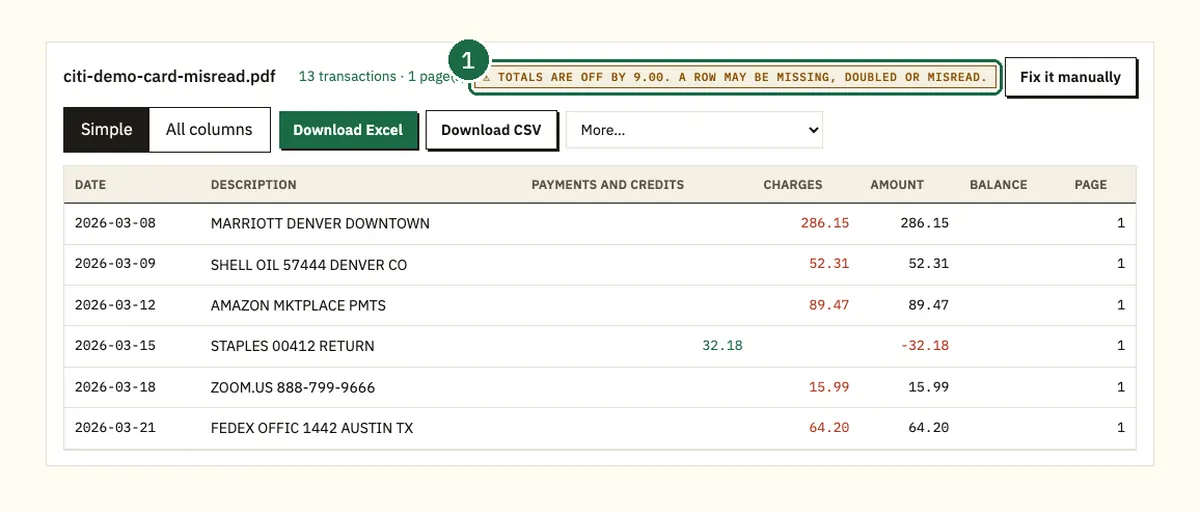
Sometimes the check fails. In our misread demo, the Delta Air Lines row was read as 421.80 instead of 412.80. The totals don't match, so check the rows. The badge says the totals are off by $9.00 and that a row may be missing, doubled or misread.
Here's how to find the problem fast:
- Note the difference shown on the badge.
- Look for a row with that exact amount. If you find one, it may be doubled or missing.
- If the difference divides evenly by 9, as $9.00 does, suspect two swapped digits. 421.80 and 412.80 is a classic case.
- Open the PDF and compare the rows near the large amounts first.
- Fix the cell in Excel and the Amount total will match the statement again.
A mismatch on a scanned statement is more likely than on a downloaded PDF. When you can, use the PDF from Citi Online rather than a scan of the paper copy.
Your files are deleted after 24 hours if you're not signed in, or after 7 days on a free account.
FAQ
Is there a free way to convert a Citi statement to Excel?
Yes. Our converter handles 3 pages a day without an account and 15 a day with a free account. Excel and CSV downloads are both free.
Why don't my Excel totals match my Citi statement?
Usually a row was misread, doubled or missed. Compare the difference with the rows in the PDF. A difference that divides by 9 often means two digits were swapped.
Does the Excel file include interest and fees?
Any interest charge or fee listed among the transactions is read like any other row. The year-to-date totals in the interest and fees section are part of the statement summary, so read those from the PDF.
Can I convert old Citi credit card statements?
Yes, once you have the PDF. Citi's card guide says older statements are requested and can take 48 to 72 hours. They are then available for 7 days, so download them promptly.
Why are payments negative in my spreadsheet?
A payment lowers what you owe on the card. Purchases raise the balance and show as positive. Payments and credits lower it and show as negative.
Related Citi guides
- How to download a Citi statement PDF
- How far back Citi statements go
- Get Citi transactions into QuickBooks
- Citi CSV download vs PDF statement
Not affiliated with Citigroup. Citi is a trademark of its owner.