
Your Citi account holds the transactions and QuickBooks Online needs them, ideally without typing a single row. You can import Citi into QuickBooks three ways: connect the account as a bank feed, upload a file you download from Citi, or upload a file made from your PDF statements. For months the feed and the download can't reach, convert your Citi statement to Excel or CSV first and upload that.
Quick answer: In QuickBooks Online, open Bank transactions and connect your Citi account for new activity. Intuit says feeds reach back 90 days to 24 months depending on the bank. For earlier months, upload a Citi CSV with its columns fixed, or convert your PDF statements to CSV. Then reconcile each month against the statement.
On this page
- What are the ways to import Citi into QuickBooks?
- How do you connect Citi to QuickBooks with a bank feed?
- How do you upload a Citi CSV to QuickBooks?
- What files does QuickBooks Online accept?
- What if you need months the feed and download can't reach?
- Worked example: one Citi card month for Roshan Demo LLC
- Common mistake: the feed and a file bring in the same days
- What about Citi business accounts?
- FAQ
- Related Citi guides
What are the ways to import Citi into QuickBooks?
There are three. Most people use the feed for new activity and files for the months before it starts.
| Route | How far back | Best for |
|---|---|---|
| Bank feed (connect Citi) | 90 days to 24 months, varies by bank | Activity from now on |
| CSV or other file from Citi | Whatever your account's download menu offers | Recent months the feed missed |
| Converted PDF statement | Any statement you can still get from Citi | Older months and catch-up work |
Pick the route by the date your books need to start from. Let the feed cover what it can. Use files only for the gap before its first transaction.
How do you connect Citi to QuickBooks with a bank feed?
You connect it once from the Bank transactions page. After that QuickBooks pulls in new activity on its own. Intuit says feeds work for checking, savings and credit card accounts.
- In QuickBooks Online, go to All apps and then Accounting. Open Bank transactions.
- Select Connect account. If you've linked an account before, select Link account.
- Search for your bank and sign in.
- Pick the accounts you want and follow the prompts to finish.
How far back does the feed go? Intuit says download timespans vary by bank, from 90 days up to 24 months. Intuit doesn't list a figure for Citi. So after you connect, look at the earliest date that arrived. Anything before that date needs a file.
Some QuickBooks users report Citi card feeds dropping out for a while. That's a user report, not a statement from Intuit or Citi. If your feed stops, the file routes below cover the missing days.
How do you upload a Citi CSV to QuickBooks?
If your Citi account offers a CSV download, you can bring it in with Upload from file. Citi doesn't publish a consumer download guide we could verify. The file types and date range depend on your account, so check the download menu on the account's activity page in Citi Online. Our comparison of the Citi CSV download and the PDF statement explains what each one holds.
Fix the columns first
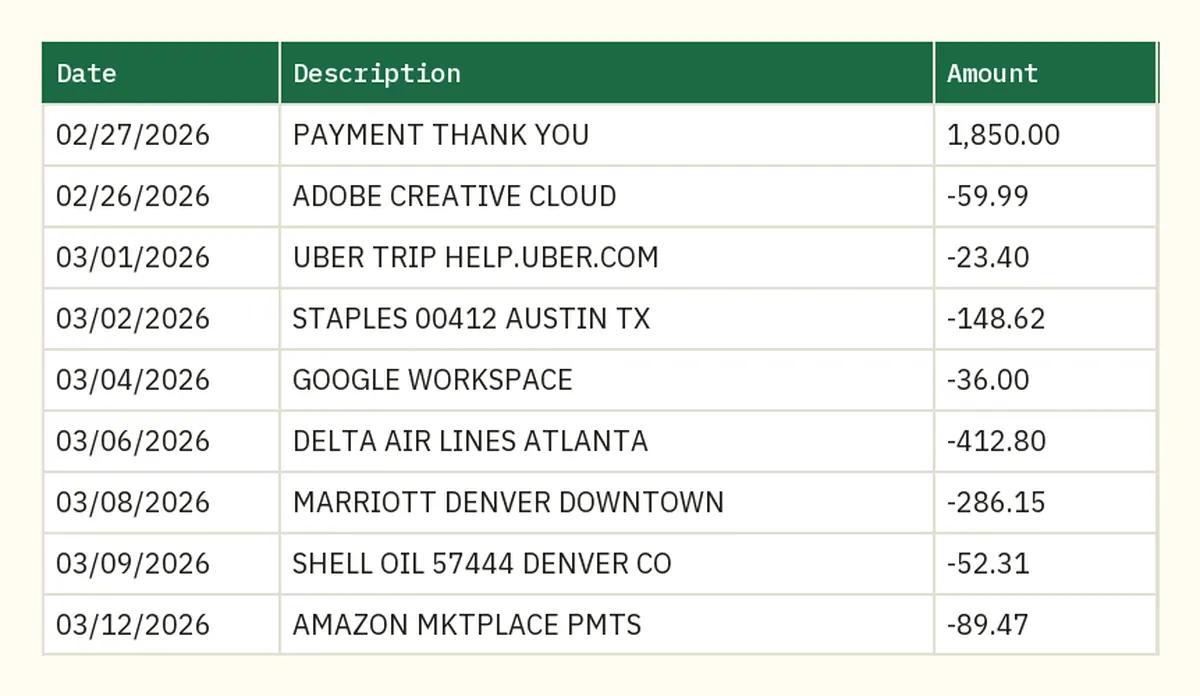
QuickBooks Online reads a CSV with 3 or 4 columns. The 3-column layout is Date, Description and Amount. The 4-column layout is Date, Description, Credit and Debit. A bank's CSV often has extra columns or headers QuickBooks won't map, and then the upload fails.
Our free QuickBooks CSV Fixer turns a bank or card CSV into the 3- or 4-column file QuickBooks Online accepts. It runs in your browser. You get 2 free files a week, or 5 a week with a free account.
If you'd rather edit the file by hand, Intuit lists these fixes:
- Remove the word "amount" from the Credit and Debit headers.
- Leave a cell blank instead of filling it with a zero.
- Use one date format in every row.
- If the date column includes the weekday, split it out.
Upload it to QuickBooks
- On Bank transactions, select the tile for the account.
- Open the Link account dropdown and choose Upload from file. If the account isn't connected, choose Upload transactions.
- Choose the file, then the QuickBooks account it belongs to.
- Match the columns and select the transactions you want.
- Confirm with Yes, then select Done.
Then match or categorize each new row. Until you do, it doesn't touch your books.
What files does QuickBooks Online accept?
Intuit's rules are short, and most failed uploads break one of them. These come from Intuit's guide to manually uploading transactions into QuickBooks Online.
| Rule | What Intuit says |
|---|---|
| File types | .csv, .txt, .qbo or .ofx (QFX is not on the list) |
| Preferred type | A QuickBooks Online data (QBO) file |
| Size | 350 KB or less |
| Length | Up to 1,000 lines per upload |
| CSV layout | 3 columns (Date, Description, Amount) or 4 columns (Date, Description, Credit, Debit) |
| Language | English |
If a file is too big, Intuit's fix is a shorter date range. A busy card account can pass 1,000 lines in a few months. Upload one month or one quarter at a time, in date order.
QuickBooks Desktop is stricter. Intuit says Desktop's Web Connect reads only .qbo files, and you download them from the bank's website rather than from inside QuickBooks.
What if you need months the feed and download can't reach?
Use the PDF statements. They go back further than a feed, and a file made from them uploads like any other. Citi says checking and savings customers can see up to 24 months of statements online right away. Archived ones become available within 24 to 48 hours of a request. If you still need the PDFs, here's how to download your Citi statement PDFs.
Upload the PDFs to our bank statement converter and it reads every row. Excel and CSV downloads are free. QuickBooks (.qbo), OFX and QIF files come with the paid plans, under More. Both .qbo and .ofx are on Intuit's upload list.
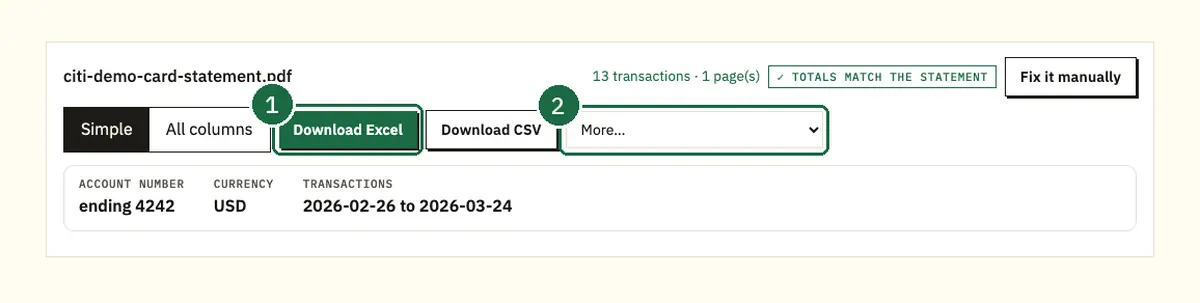
Before you download, look at the balance check.
On a card statement the converter adds the rows to the previous balance and compares the result with the new balance. On a bank statement it checks every printed running balance against the row before. A row that doesn't add up gets a warning. Fix it there and it never reaches QuickBooks.
Watch the signs on a card statement. The converter's sheet has Payments and credits, Charges and Amount columns. In Amount, charges are positive and payments are negative, the way they move the card balance. QuickBooks reads positive as money in, so a card CSV needs its signs swapped before upload. The CSV Fixer has a "Swap money in and money out" option for that. In the .qbo export, charges already reduce the account.
You can add several PDFs at once. They come back as one spreadsheet with a column showing which file each row came from. Keep that column for your own review, then delete it in the copy you upload. If the combined file passes 1,000 lines, split it.
Free use is 3 pages a day without an account and 15 a day with a free account. No card is needed.
Worked example: one Citi card month for Roshan Demo LLC
Here's our demo card statement for Roshan Demo LLC, card ending 4242. The billing period runs 02/26/26 to 03/26/26. It shows a previous balance of $1,850.00 and a payment of $1,850.00. It also has one credit (a $32.18 return) and $1,215.18 in purchases. The new balance is $1,183.00.
- Convert the PDF. The preview lists 13 rows and the badge says the totals match the statement.
- Check the math yourself once: $1,850.00 minus the $1,850.00 payment and the $32.18 return, plus $1,215.18 in purchases, is $1,183.00.
- Download the CSV and run it through the CSV Fixer with "Swap money in and money out" turned on. You get Date, Description and Amount, with purchases negative. STAPLES 00412 AUSTIN TX shows as -148.62 and PAYMENT THANK YOU as 1,850.00.
- Upload it to the Citi card account in QuickBooks, not to checking.
- On the review screen, confirm all 13 rows are there.
- Reconcile with 03/26/26 as the ending date and $1,183.00 as the ending balance.
The demo statement has both a Sale Date and a Post Date column. QuickBooks takes one date. Pick one and use the same one every month so your months line up.
Check the signs before you finish. Purchases should raise what you owe. The payment and the return should lower it.
Common mistake: the feed and a file bring in the same days
Say the feed already brought in the first week of a month. If you then upload a file covering that week, every transaction in it appears twice. The reconciliation won't balance.
- Before uploading: note the earliest date the feed brought in. End your file the day before it.
- After uploading: match each row to the record that's already there instead of adding it again.
A quick count catches it early. Compare one month's rows in QuickBooks with the statement. Our demo month has 13 rows. Sixteen in QuickBooks would mean three came in twice.
What about Citi business accounts?
CitiBusiness Online has its own download options, and Citi documents them. Citi's CitiBusiness Online FAQ says you can download account activity straight into QuickBooks as QBO (QuickBooks Web Connect) or QFX (Quicken Web Connect). It also makes CSV files for Excel and BAI files. Citi says Web Connect is more accurate than QIF or CSV and helps avoid duplicates.
Citi's CitiBusiness help pages add two limits. The activity report covers the past 180 days. Credit account activity can't be downloaded in QBO or QFX format.
So a business checking account can use QBO for the last 180 days. A business card, or anything older, goes through the statement route above. These details are for CitiBusiness only. Don't assume a personal Citi account offers the same.
FAQ
How far back does a Citi bank feed go in QuickBooks?
Intuit says feed history varies by bank, from 90 days up to 24 months. It doesn't give a Citi figure. Check the earliest date after you connect and use a file for anything before it.
Can I upload a Citi QFX file to QuickBooks Online?
QFX isn't on Intuit's list for QuickBooks Online. The accepted types are .csv, .txt, .qbo and .ofx. Use a QBO or CSV file instead.
Why won't QuickBooks accept my Citi CSV?
It's usually the columns. QuickBooks Online wants 3 or 4 columns, one date format and no more than 1,000 lines or 350 KB. Fix the layout with the CSV Fixer or trim the extra columns by hand.
Does a Citi credit card import differently?
The steps are the same. Upload to the credit card account in QuickBooks, not checking. Then reconcile against the card statement's new balance.
Do I still need to reconcile after importing?
Yes. Importing only adds rows. Reconciling against each statement's ending balance shows nothing was missed or doubled.
Related Citi guides
- Downloading a Citi statement PDF online and in the app
- Citi credit card statement to Excel
- How far back Citi statements go
- Citi CSV download vs PDF statement
Not affiliated with Citigroup. Citi is a trademark of its owner.