
To download a Citi statement, sign in to Citi Online on a computer, open the statements for your card or bank account and save the PDF. The Citi Mobile app shows statements too. Citi credit cards and Citibank checking or savings accounts work a little differently, so this guide covers each one. Once the PDF is saved, you can convert your Citi statement to Excel if you need the numbers in a spreadsheet.
Quick answer: Sign in to Citi Online and open the statements section for the account. Pick the statement date and download the PDF. Citibank checking and savings accounts show 24 months of statements right away, and older ones arrive within 24 to 48 hours of a request. You can also view statements in the Citi Mobile app.
On this page
- Citi credit cards vs Citibank bank accounts at a glance
- How to download a Citi statement for a credit card
- How to get Citibank checking and savings statements
- Can you download a Citi statement in the Citi Mobile app?
- What to do when a Citi statement is missing
- Check the PDF before you send or convert it
- FAQ
- Related Citi guides
Citi credit cards vs Citibank bank accounts at a glance
Citi runs its credit cards and its bank accounts a bit differently. The table puts the two side by side, with the source for each line.
| Citi credit card | Citibank checking or savings | |
|---|---|---|
| Where to find statements | Citi Online or the Citi Mobile app | Citi Online or the Citi Mobile app, in PDF format |
| Recent statements | Listed under Recent Statements in Citi's older card guide | Up to 24 months available right away |
| Older statements | Requested by month, ready in 48 to 72 hours per Citi's older card guide | Archived statements ready within 24 to 48 hours of a request |
| How long a requested file stays | 7 days only, per the same guide | Citi doesn't say, so save it right away |
| Statement period | Billing cycle of 28 to 31 days | Statement Period of 28 to 31 days |
| Exceptions | Statements issued before you registered the card for Citi Online may not show right away | No online statements for IRAs or stand-alone CDs |
A note on sources. The bank account lines come from Citi's current bank statements page and its deposit account agreement. The card steps come from Citi's own step-by-step guides, which are several years old. The steps still describe how Citi card statements work, but the button names on your screen may be worded a little differently today.
How to download a Citi statement for a credit card
Use a computer if you can. The website gives you a file you can rename and attach, which is easier than saving from a phone.
- Sign in to Citi Online and select your card.
- Open the statements link for the card. Citi's guide calls it Statements (PDF).
- Under Recent Statements, choose the statement date in the drop-down.
- If a second drop-down asks for a format, choose PDF.
- Click Download. The statement opens as a PDF in a pop-up window.
- Save the PDF to your computer.
If nothing opens after you click Download, your browser is probably blocking the pop-up. Citi's guide says pop-ups must be allowed. Allow them for citi.com and click Download again.
If your screen looks different
Citi has updated its website since that guide was written. If you can't find a link called Statements (PDF), look for a statements option on the page for that card or in the main menu. The idea is the same: pick the card, pick the statement date and save the PDF. We won't guess the exact new label, because we couldn't confirm it on a Citi page.
A statement is not the same as account activity
The account page for a Citi card shows transactions since your last statement. Citi's guide lists tabs there such as Pending and Purchases. That list is handy for checking recent charges, but it isn't a statement. A statement lists posted transactions up to the closing date. Anything still pending shows up on a later one.
Lenders and accountants usually want the statement itself, since it carries the balances and the billing period. If you're weighing a transaction file against the PDF, our comparison of a Citi activity file and the PDF statement explains what each one includes.
How to get Citibank checking and savings statements
Citi says you can view checking and savings statements online in PDF format. If you use paperless statements, Citi also sends an email each month with a link when the new statement is ready. That link is the quickest route to the latest month.
For other months, the steps follow the same pattern as cards:
- Sign in to Citi Online on a computer.
- Open the checking or savings account you need.
- Look for the statements option for that account. Citi doesn't publish the exact label, so check the account page and the main menu.
- Pick the month and save the PDF.
According to Citi's bank statements page, the last 24 months are there right away. Older statements are archived, and you request them.
Things that trip people up on bank statements
- Several accounts on one statement. Citi's deposit agreement says accounts may be grouped on one statement. If one account doesn't seem to have its own file, check whether it shares a statement with another account.
- Periods that aren't calendar months. A Citibank Statement Period can be any 28 to 31 days. A "March" statement may start in February.
- IRAs and stand-alone CDs. Citi says online statements aren't available for these. Call Citi for those records.
- Business accounts. Paperless statements aren't available for business accounts managed through Citi Online, per the same Citi page.
Paperless delivery is managed under Manage Paperless Settings on Citi Online or Citi Mobile. Citi also says bank accounts opened online must use paperless statements.
Can you download a Citi statement in the Citi Mobile app?
Yes. Citi says statements are available on Citi Online or the Citi Mobile app. Its credit card explainer also says you can view or download your statement in the app.
Citi doesn't publish a tap-by-tap path for the US app, so we won't make one up. In general it works like this:
- Open the Citi Mobile app and sign in.
- Tap the card or account you need.
- Look for Statements in that account's options or menu.
- Pick the month. The statement opens as a PDF.
How you save the PDF from there depends on your phone. For one month, the app is fine. For a year of statements going to an accountant, the website is faster because every file lands in one folder on your computer.
What to do when a Citi statement is missing
A statement that isn't in the list usually has a simple cause. Work through these in order.
- Check the date range. The statement may be older than the recent list, so it needs a request.
- Check when you registered. Citi's card guide says only statements issued after the card was registered for Citi Online are available right away.
- Check the account type. IRAs and stand-alone CDs have no online statements.
- Check grouped statements. A bank account may share a statement with another account.
Requesting an older card statement
Citi's card guide describes an Older Statements section. Select the year and month, then click Request. The status shows Processing Request, and Make Another Request lets you add more months. Citi says requests may take 48 to 72 hours.
When it's ready, go back to the statements page and open Older Statement Request Status. The file shows as Ready for Download. Save it straight away, because the guide says requested older statements stay available for 7 days only. As with the other card steps, the labels on your screen may differ a little from that guide.
Requesting an older bank statement
Citi says archived checking and savings statements become available within 24 to 48 hours of your request. Citi doesn't describe the request screen, so look for an older or archived statements option in the account's statements area. If you can't find it, call Citi Customer Service at 1-800-347-4934 or CitiPhone Banking at 1-888-CITIBANK. For a card, call the number on the back of your card.
Citi's deposit agreement lists copies of statements issued within the last 7 years among the services it provides at no charge. For the full picture of what's online and what needs a request, see our guide on how far back Citi statements go.
Check the PDF before you send or convert it
Open each file before it goes anywhere. Three quick checks catch most mistakes.
- The last four digits on the PDF match the account you were asked for.
- The statement period covers the dates you need.
- Every page is there, including the transaction pages.
Then give it a name that sorts by date, such as 2026-03 Citi Card 4242.pdf. One folder per account per year keeps a request for "the last two statements" quick to answer.
Turning the PDF into a spreadsheet
If you need the transactions in Excel, upload the PDF to our converter. You can add several statements at once and download them as one spreadsheet, with a column showing which file each row came from.
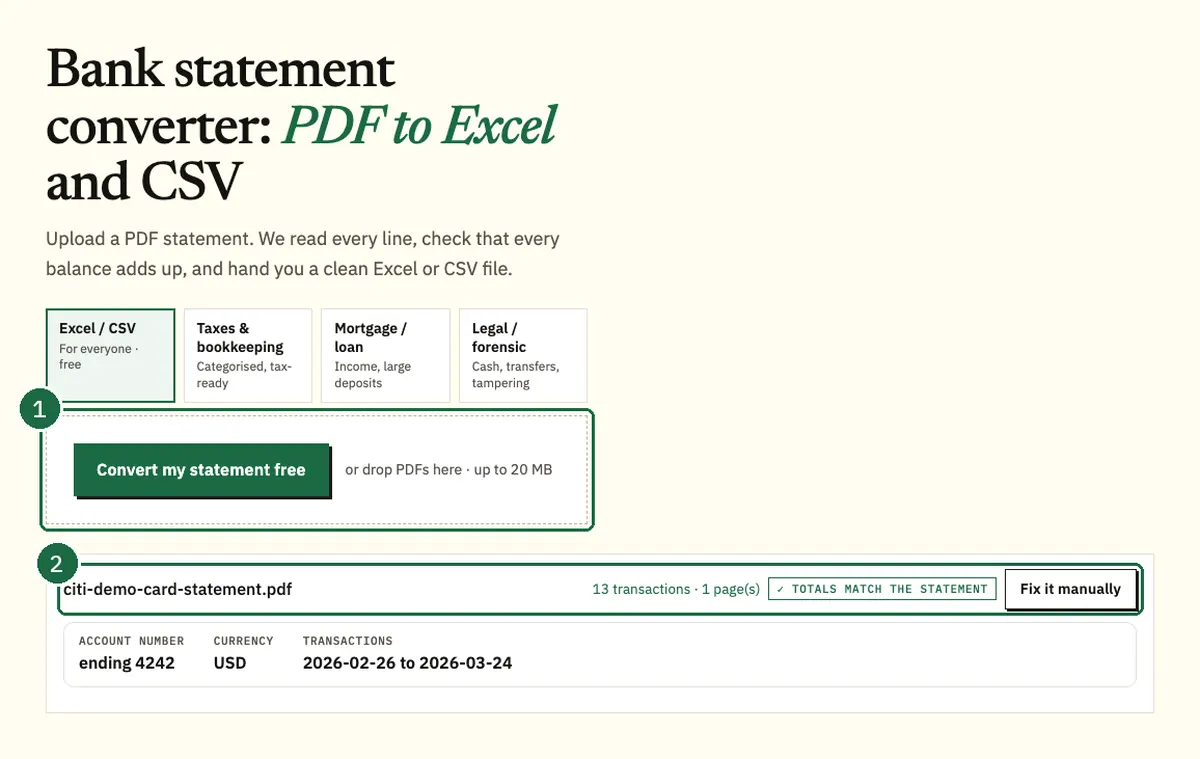
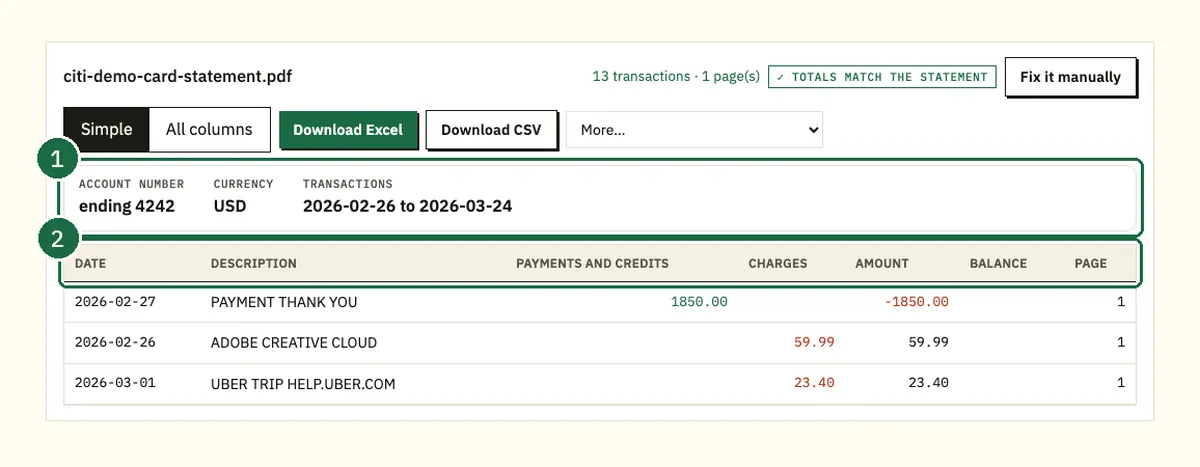
Here's how that looks with our demo statement. Roshan Demo LLC has a card ending 4242 with a billing period of 02/26/26 to 03/26/26. The statement shows a previous balance of $1,850.00 and a $1,850.00 payment. There's one $32.18 return and $1,215.18 of purchases. The new balance is $1,183.00.
The converter reads the 13 rows into five columns. They are Date and Description, then Payments and credits, Charges and Amount. In Amount, charges are positive and payments and credits are negative, the same way they move the card balance. It then checks that the previous balance plus the rows equals the new balance. Here that's $1,850.00 minus $1,850.00 minus $32.18 plus $1,215.18, which gives $1,183.00.
If a PDF is password protected, the converter asks for the password once and doesn't store it. Most statements take under a minute. Excel and CSV downloads are free for 3 pages a day without an account.
FAQ
Where do I find my Citi statements online?
Sign in to Citi Online and open the statements area for the card or account. Citi's older card guide calls the link Statements (PDF), and the wording on your screen may differ today. The Citi Mobile app shows statements too.
How long does it take to get an older Citi statement?
For checking and savings, Citi says archived statements are available within 24 to 48 hours of your request. For cards, Citi's older guide says requests may take 48 to 72 hours.
How long does a requested Citi card statement stay available?
Citi's card guide says requested older statements are available for 7 days only. Save the PDF as soon as it shows Ready for Download.
Why can't I see statements for my Citi IRA or CD?
Citi says online statements aren't available for IRAs or stand-alone CDs. Call Citi Customer Service at 1-800-347-4934 to ask how to get those records.
Does Citi email my statement?
With paperless statements, Citi emails you each month with a link when your statement is ready. You change this under Manage Paperless Settings on Citi Online or Citi Mobile.
Related Citi guides
- How to convert a Citi credit card statement to Excel
- Getting older Citi statements on request
- How to get Citi transactions into QuickBooks
- Citi CSV download vs PDF statement
Not affiliated with Citigroup. Citi is a trademark of its owner.