
A Citi CSV download is a list of account activity for the dates you pick. A Citi PDF statement is the fixed record of one statement period, with a starting balance, an ending balance and printed totals. Use a CSV for quick sorting if your account offers one. When the numbers have to match what Citi issued, use the statement and convert your Citi statement to Excel so you still end up with a spreadsheet.
Quick answer: Citi confirms CSV downloads for business accounts on CitiBusiness Online. For personal cards and bank accounts, Citi's public pages don't list the formats, so check the download menu in your own account. Use a CSV for sorting and searching. Use the PDF statement for lenders, taxes and reconciling, because only it has fixed balances and totals.
On this page
Does Citi offer a CSV download?
For business accounts, yes. Citi spells it out. For personal accounts, we couldn't find a current Citi page that says which file types you get or how far back they go. So here is what is confirmed and what you should check yourself.
Citi business accounts: confirmed
Citi's CitiBusiness help page on balance and information reporting lists six download formats:
- QBO, for QuickBooks Web Connect.
- QFX, for Quicken Web Connect.
- QIF, the older Quicken format.
- CSV, the plain spreadsheet file that opens in Excel.
- BAI, a banking data format.
- CSX, a CSV with extra columns for the BAI transaction code and the check number.
The same page says recent account activity goes back up to 180 days. Credit account activity can't be downloaded as QBO or QFX. Business statements are PDFs, with the last 24 months available right away and older ones up to 7 years on request.
Personal cards and bank accounts: check your own menu
Citi's own card tutorial from 2016 shows an Account Details page listing transactions since your last statement. It has a Pending tab and an "Activity Since Last Statement" drop-down for earlier cycles. An older Citi card page says statements could be downloaded in formats that include PDF, Quicken and Microsoft Money. Both are years old and the menus may have changed.
Sign in to Citi Online on a computer and open the account. On the activity page, look for:
- A download or export option and the list of file types it offers. CSV is the one for Excel.
- A date range setting. Note the earliest date it lets you pick.
- Whether pending transactions end up in the file.
- Whether your card and your checking account give you the same choices.
We couldn't find a Citi page that says the Citi Mobile app makes a CSV. If you're on your phone, plan on the PDF statement.
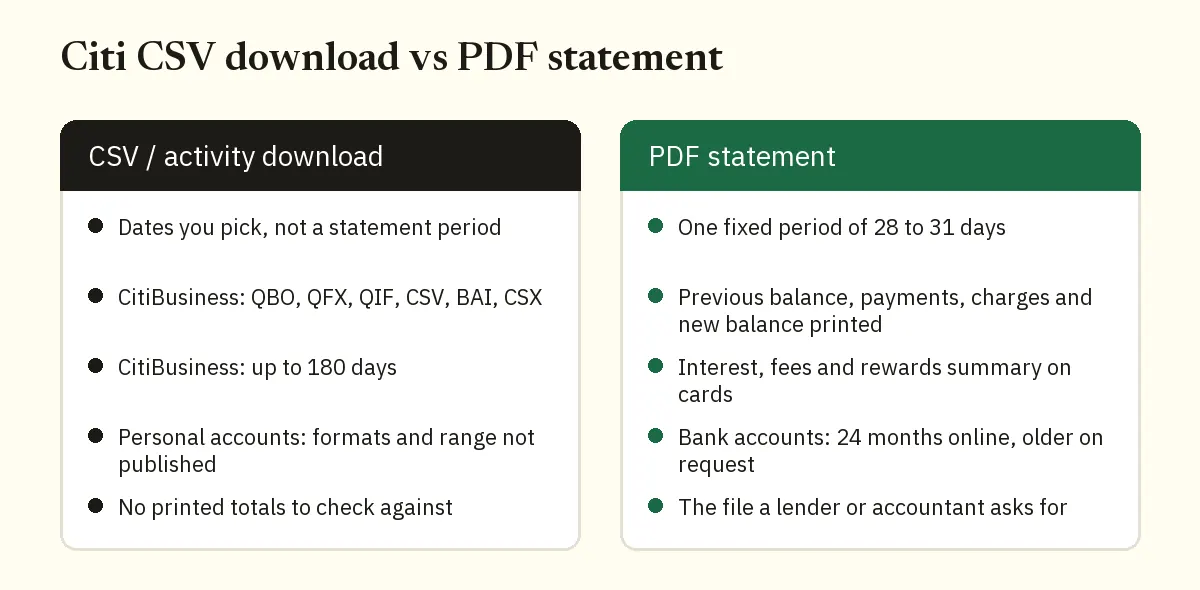
Citi CSV download vs PDF statement at a glance
The CSV is a window you draw over your activity. The statement is a closed period that Citi draws for you. Most of the differences below come from that.
| Question | CSV or activity download | PDF statement |
|---|---|---|
| What dates does it cover? | The range you pick, within whatever your account allows | One statement period: 28 to 31 days for bank accounts, typically 28 to 31 days for cards |
| How far back? | Business: 180 days. Personal: not published by Citi | Bank accounts: 24 months right away, older on request. Business: up to 7 years |
| File types | Business: QBO, QFX, QIF, CSV, BAI, CSX. Personal: check your menu | |
| Opening and closing balance | Don't count on it in a transaction list | Yes, printed on the statement |
| Printed totals | No, you add them up yourself | Yes, in the Account activity summary on card statements |
| Interest, fees and rewards summary | No | Yes on card statements |
| Pending transactions | May be included, so check | Posted transactions up to the closing date |
| Ready for Excel? | Yes | After converting |
Why the PDF statement is the fixed record
A statement covers set dates and never changes after it's issued. Open the March statement next year and it shows the same rows and the same totals. Run an activity download twice with different dates and you get two different files. Neither file is wrong. Neither has to line up with what Citi printed.
A Citi card statement carries more than the transaction list. Citi's guide to reading a card statement lists these parts:
- An Account activity summary. It runs from the previous balance through payments and credits, purchases, and fees and interest to the new balance.
- Payment information with the minimum payment and the due date.
- Interest charges, fees and rates, with year-to-date totals.
- A reward summary.
A CSV gives you the rows. It doesn't give you the summary that proves the rows are complete.
Bank statements work the same way. Citi's deposit agreement defines the statement period as any 28 to 31 day period. It also lets Citi group several of your accounts on one statement. So a single PDF can hold more than one account. That's worth knowing before you compare it with a CSV from one account.
With paperless statements, Citi emails you each month when a bank statement is ready. Save the PDF when it arrives. The last 24 months are online right away, and archived ones take 24 to 48 hours after you ask.
When should you use the CSV and when the PDF?
Ask who will rely on the numbers. If it's just you, the CSV is often fine. If it's someone else, send statements.
Use the CSV when
- You want to sort or tag recent spending by category.
- You're looking for one charge and need to filter by description.
- You run a Citi business account and want QBO or CSV straight into your books for the last 180 days.
- You need a custom window, like one week, that no statement matches.
Use the PDF statement when
- A lender, landlord or accountant asks for bank statements.
- You're reconciling. That needs a fixed closing balance on a fixed date.
- You need months your download doesn't reach.
- Your account has no download option at all.
- You want the interest, fee and rewards figures that only the statement shows.
If you haven't saved your PDFs yet, our guide on how to download a Citi statement PDF covers cards and bank accounts.
How to check a Citi CSV against your statement totals
If you do use a CSV, test it against the statement before you trust it. It takes five minutes.
- Open the statement. Write down the period dates and the totals from the Account activity summary. For a bank account, write down the opening and closing balance.
- Filter the CSV to exactly those dates, not the calendar month. If the file has both a sale date and a posted date, try the posted date first.
- Take out pending rows. A statement lists posted transactions up to the closing date. Anything still pending shows up later.
- Add up payments and credits in one total and charges in another.
- Do the balance math. For a card, take the previous balance, subtract payments and credits and add charges. You should land on the new balance.
Worked example: the Roshan Demo LLC card
Our demo card statement ends in 4242 and runs from 02/26/26 to 03/26/26. It has 13 rows. The previous balance is $1,850.00. Payments and credits total $1,882.18. That's a $1,850.00 payment plus a $32.18 return. Charges total $1,215.18.
$1,850.00 minus $1,882.18 plus $1,215.18 gives $1,183.00. That matches the new balance printed on the statement.
Now picture a CSV filtered to March 1 through March 31. Anything that posted from February 26 to 28 drops out. Anything that posted after March 26 sneaks in, and it belongs to the next statement. The totals won't match, even though both files are correct.
If your numbers still don't add up, check these:
- Two downloads with overlapping dates pasted together, so some rows appear twice.
- Payments and charges with the wrong sign after you merged two amount columns.
- A bank statement that groups several accounts while your CSV holds only one.
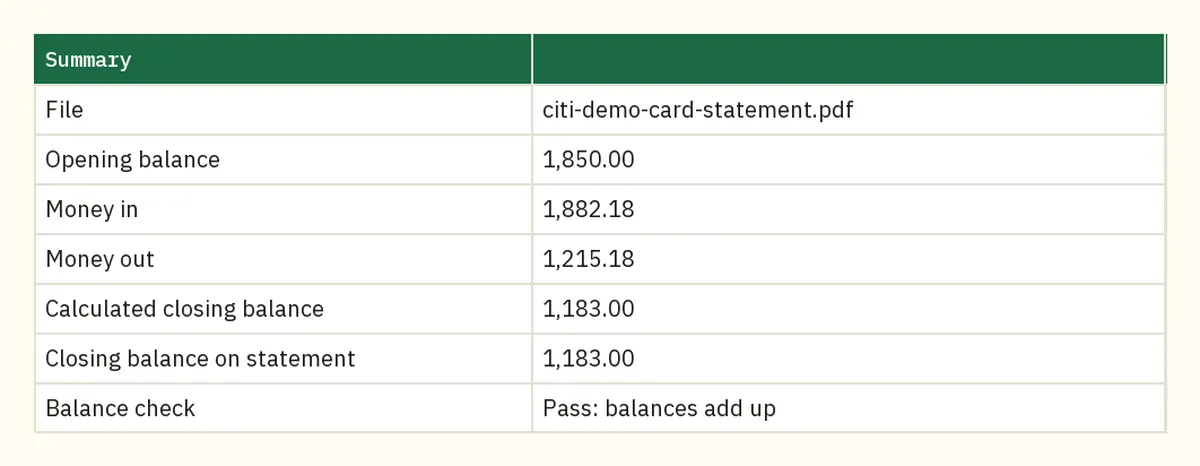
Our bank statement converter runs this check for you on every PDF. Its Summary sheet shows the opening balance with money in and money out. It then puts the calculated closing balance next to the closing balance on the statement. For the demo card that reads 1,850.00 opening, 1,882.18 in, 1,215.18 out and 1,183.00 for both closing figures. The balance check says "Pass: balances add up". If a bank statement row doesn't add up, it's flagged with a warning.
What if there's no CSV or it doesn't go back far enough?
Convert the statements instead. You get the same spreadsheet, and every month ties to Citi's printed balances.
- Download the PDF statements you need from Citi Online.
- Upload them to our Citibank statement converter. You can add several PDFs at once.
- Check the Summary sheet for a passing balance check.
- Download Excel or CSV. With several files you get one spreadsheet and a column showing which PDF each row came from.
Converted card statements have five columns. Date and Description come first, then Payments and credits, Charges and Amount. Charges are positive in Amount and payments are negative, the same way they move the card balance.
Excel and CSV downloads are free. That's 3 pages a day without an account and 15 a day with a free account, with no card needed. QuickBooks (.qbo), OFX and QIF files come with the paid plans. If a PDF has a password, the converter asks for it once and doesn't store it. Files are deleted after 24 hours if you're not signed in.
Heading to QuickBooks? QuickBooks Online takes .csv, .txt, .qbo and .ofx uploads in a 3 or 4 column layout. Our guide to getting Citi transactions into QuickBooks covers the upload and the column format.
FAQ
Can I export Citi transactions to Excel?
On CitiBusiness Online, yes. Citi lists a CSV format that opens in Excel. For personal accounts, look for a download option on the activity page, or convert the PDF statement to Excel.
How far back can I download Citi transactions?
Citi says CitiBusiness activity downloads cover up to 180 days. For personal accounts, Citi doesn't publish a limit we could verify. Bank statements cover the last 24 months right away, with older ones on request.
Can I get a CSV from the Citi Mobile app?
We couldn't find a Citi page that says so. Citi does say you can view or download your card statement in the app. Use a computer for an activity download, or convert the PDF.
Why doesn't my CSV match my Citi statement?
Usually the dates differ. Statement periods run 28 to 31 days and rarely match the calendar month. Pending rows and overlapping downloads are the next things to check.
Will a lender accept a CSV instead of statements?
Plan on sending the PDF statements. A CSV is a file you exported yourself and has no printed balances. Ask the lender if you're unsure.
Can I download QBO or QFX files from Citi?
CitiBusiness Online offers both for bank accounts but not for credit account activity. For personal accounts, check the format list in your download menu.
Related Citi guides
- Download a Citi bank statement PDF
- Turn a Citi credit card statement into Excel
- How far back Citi statements go
- Import Citi transactions into QuickBooks
Not affiliated with Citigroup. Citi is a trademark of its owner.