
American Express already lets you download two years of card transactions as an Excel or CSV file, so start there. You only need to convert an Amex statement to Excel from the PDF when you want an older, archived statement, or a spreadsheet that matches one billing statement exactly; for that, upload the PDF to our free bank statement converter.
Quick answer: For recent activity, download it from Statements & Activity as Excel or CSV. For a full billing statement, open it from the statement list, save the PDF, upload it in the box above, check the rows and download Excel or CSV.
On this page
- How to convert an Amex statement to Excel from the PDF
- More on saving and checking an Amex PDF
- What Amex lets you export without a converter
- Reading an American Express card statement
- Disputing an Amex charge
- Amex PDFs that need a closer look
- Amex charges in QuickBooks, Xero or Sheets
- Uploading an Amex statement: what happens to the file
- Amex High Yield Savings statements and 1099-INT forms
- Amex statement, export and dispute questions
- Guides for other US cards and banks
How to convert an Amex statement to Excel from the PDF
- Log in to your American Express account → Statements & Activity → select the billing statement → save the PDF.
- Upload it here, in the box near the top of this page, or open the full bank statement converter.
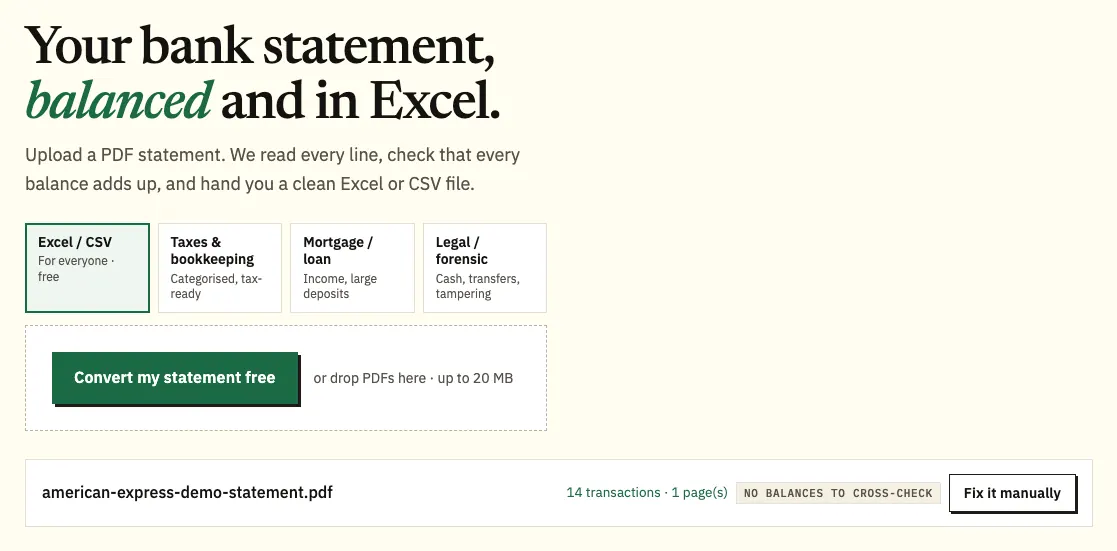
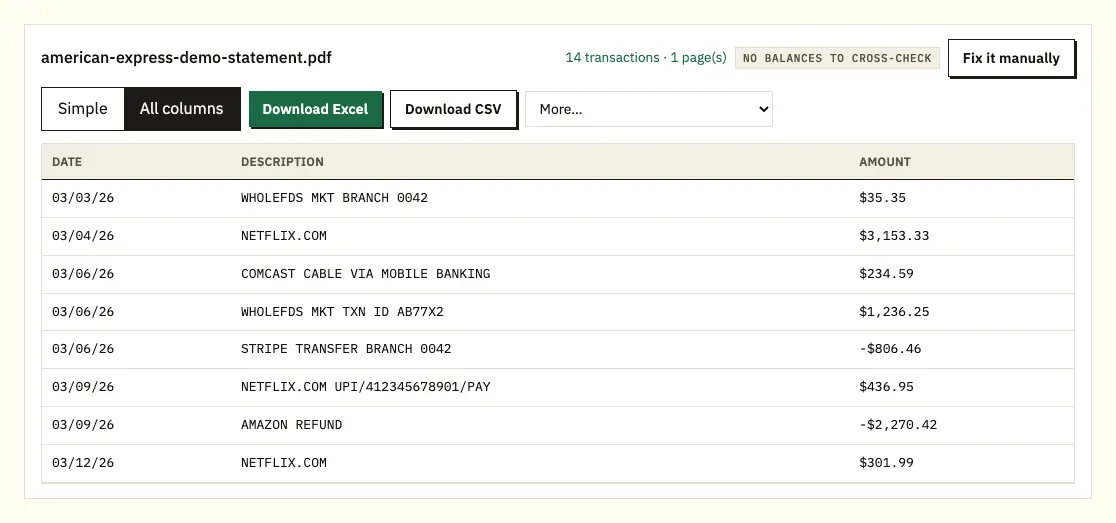
Uploading a demo American Express statement. The file name appears with the result. - Check the charges, payments and the balance warning, if there is one.
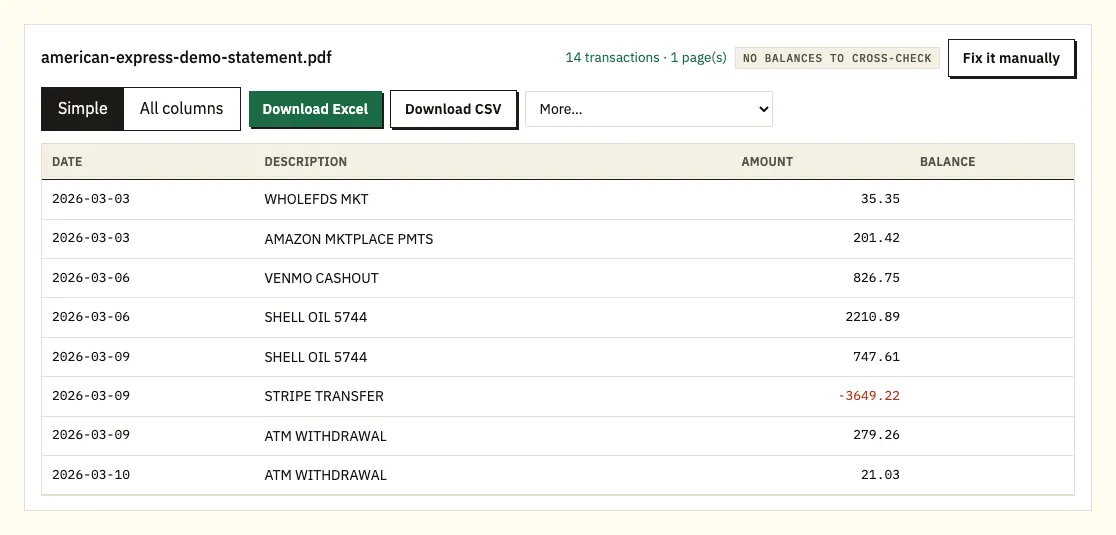
Charges as negative amounts, payments as positive, checked against the new balance. - Download the spreadsheet as Excel or CSV.
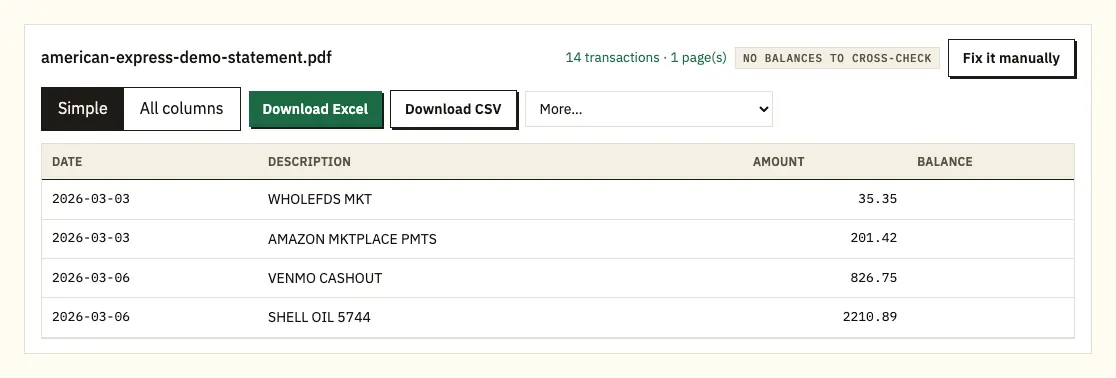
Download Excel or CSV. QuickBooks, OFX and QIF files are under More on paid plans.
More on saving and checking an Amex PDF
These steps are for a billing statement PDF. If the two-year transaction download covers what you need, the next section explains it. Statements & Activity holds both your transaction history and your billing statements, and picking a statement from the list gives you a PDF copy. This works for older statements too.
Older statements are archived. American Express says an archived statement will be available online within 24 hours, so if the statement you pick isn't ready yet, come back the next day and download it. Save the PDF file rather than a screenshot or a printout, since the file gives the most accurate result.
In the converter, each charge, credit and payment is one row. On a card statement, charges come out as negative amounts and payments and credits as positive ones, which matches what happened to your money. The rows are then added to the previous balance and compared with the new balance. If they don't match, you see a warning, and clicking a row shows it on the PDF page.
Without an account you can convert 3 pages a day, and a free account allows 15. QuickBooks (.qbo), OFX and QIF files are under More on the paid plans.
What Amex lets you export without a converter
American Express offers three downloads of its own. Use them first, and know where each one stops.
- Transaction history: your previous two years of transactions can be viewed online, sorted, filtered and downloaded as a PDF, Excel or CSV file.
- Accounting software: recent activity and the past six billing statements can be downloaded to Quicken, QuickBooks or as a CSV file. The options sit on the left side of the page.
- Year-End Summary: an annual summary of charges for the previous calendar year, broken down by month and spend category. American Express lists QuickBooks, Quicken, Excel, PDF and CSV as download formats, through a Download button.
So you don't need a converter for the last two years. The PDF route helps when you need statements older than that, which only come as archived PDFs, or when a lender, accountant or expense report needs the exact contents of one billing statement, including its previous and new balance.
| Amex downloads | Converting the PDF statement | |
|---|---|---|
| How far back | Two years of transactions; six statements for accounting software | Any statement you can open, including archived ones |
| Formats | PDF, Excel, CSV, Quicken, QuickBooks | Excel and CSV; QBO, OFX and QIF on paid plans |
| Matches one billing statement | Depends on the dates you filter | Yes, row for row with the PDF |
| Balances checked | No | Yes, previous plus rows against new balance |
| Older than two years | Archived PDF statements only | Yes, from any statement PDF |
Reading an American Express card statement
American Express doesn't publish an example of its own statement on the help pages we checked, so compare this with the headings on your PDF. Its Credit Intel guide, which covers card statements in general rather than Amex's design, lists the parts most statements include: an account summary, payment information, late payment and minimum payment warnings, account messages, the transaction history, fees and interest charged, a rewards summary, a payment coupon and the interest charge calculation.
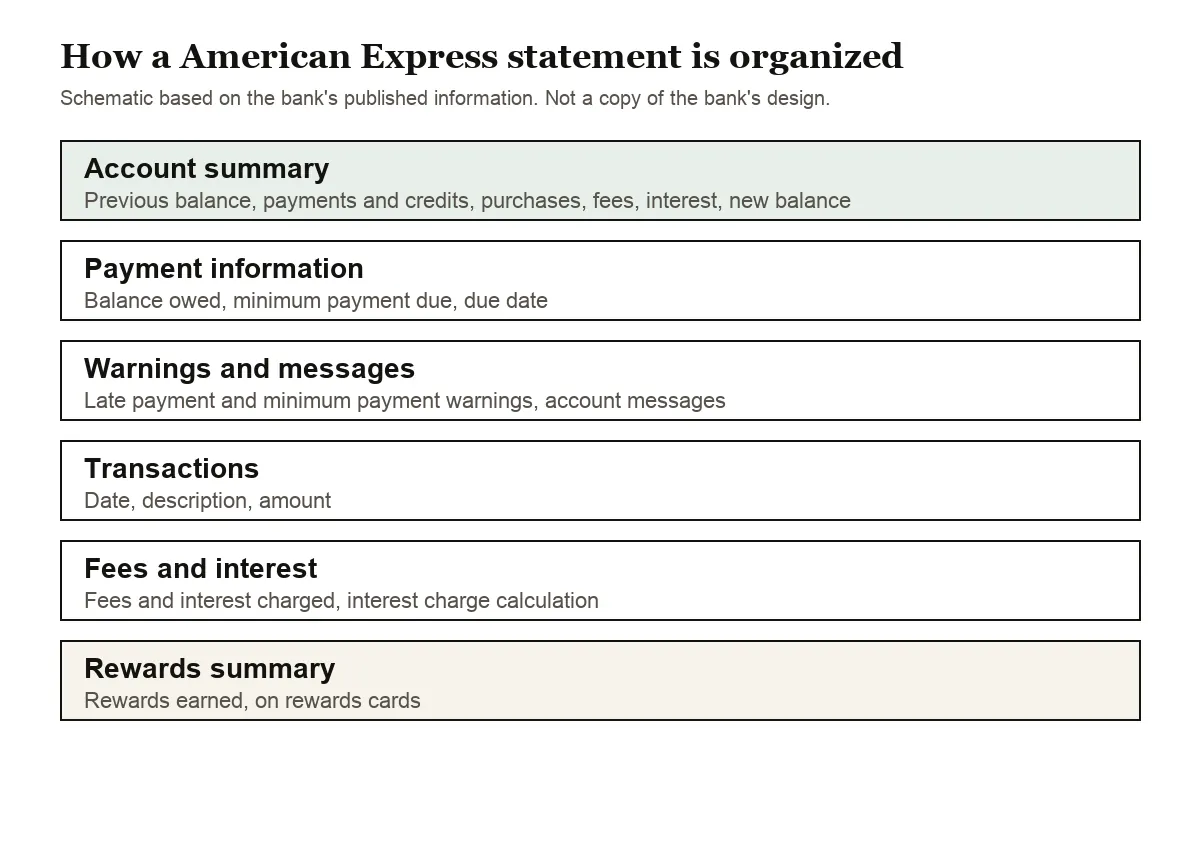
The account summary is where the arithmetic lives. It starts from the previous balance, takes off payments and credits, adds purchases, balance transfers, cash advances, fees and interest, and arrives at the new balance. When you convert the statement, the spreadsheet should follow the same path: previous balance plus every row equals the new balance.
Two dates matter on a card statement. The closing date ends the billing cycle, and purchases made before it appear on that statement. The payment due date comes later; the same guide notes that federal law requires issuers to send the statement at least 21 days before the due date.
On American Express credit cards, you can change the monthly Payment Due Date through your online account. For other Card products, such as the Green, Gold or Platinum Card, American Express asks you to chat with its Customer Care Professionals through your online account.
Disputing an Amex charge
Sorting the converted charges by merchant or amount shows duplicates and forgotten subscriptions quickly. American Express asks you to contact the merchant first, and its help page on disputing a charge explains the Dispute this Charge option in your online account.
Amex PDFs that need a closer look
Descriptions that run onto a second line
Card descriptions can include the merchant name and further details, and a long one can wrap onto a second line of the PDF. Pasted by hand, that line turns into a separate row with no amount. The converter joins it to the charge above, so each charge stays one row with its full description.
Fees and interest outside the charge list
Fees and interest can be listed apart from purchases. Check they're in your file, or your total will be short of the new balance.
Archived statements not ready
If an older statement won't open, it may still be coming out of the archive. American Express says archived statements are available within 24 hours.
Password-protected or scanned files
A locked PDF asks for its password once and doesn't keep it. Scans of paper statements are read with text recognition, which is less exact, so compare the totals with the paper.
An unusual layout
Use Fix it manually to mark out the table yourself. Paid plans remember it for the next statement.
Charges that land in the next statement
The closing date ends the billing cycle, so a purchase made on or after it shows on the following statement. If a charge seems to be missing, convert the next month too. Upload both PDFs together and the spreadsheet adds a column naming the file each row came from.
Amex download and converted statement don't match
The two-year transaction download follows the dates you filter, while a billing statement covers one cycle from closing date to closing date. Set the download to the same dates as the statement before you compare them, or work from the converted statement when you need its previous and new balance.
Amex charges in QuickBooks, Xero or Sheets
- QuickBooks: for the last six statements, Amex's own QuickBooks download may be enough. For older ones, upload the CSV or a QBO file from a paid plan. See importing into QuickBooks.
- Xero: import the CSV or OFX file into the card account. See importing into Xero.
- Google Sheets: File, Import, Upload, then pick the CSV.
Set the card up as a credit card account, so charges reduce and payments restore the balance.
Uploading an Amex statement: what happens to the file
It travels over an encrypted connection and is used only to convert it for you. It isn't shared. Without an account it's deleted after 24 hours; with a free account it stays 7 days, and you can switch on auto-delete or remove it at any time. See our security page.
Keep your own copies of statements you rely on for taxes or business expenses. The IRS explains how long to keep records that support a return.
Amex High Yield Savings statements and 1099-INT forms
American Express National Bank mails a 1099-INT for each savings account that earned at least $10 in interest, closed accounts included, and a converted savings statement is mostly deposits, withdrawals and monthly interest rows. Our guide to bank statements for your tax return shows how to total those interest rows and check them against the form.
Amex statement, export and dispute questions
Can I download my Amex statement as Excel?
Your transaction history for the previous two years can be downloaded as Excel or CSV. Billing statements themselves open as PDFs, which you can convert to get a spreadsheet of one statement.
How far back can I see Amex statements?
Two years of transactions are viewable online. Older statements are archived, and American Express says archived statements become available online within 24 hours.
Can I export Amex transactions to QuickBooks?
Yes. Recent activity and the past six billing statements can be downloaded to QuickBooks, Quicken or CSV from your online account.
Where do I find my Amex Year-End Summary?
In your online account. It covers the previous calendar year by month and spend category, and has a Download button for formats including Excel and CSV.
Why won't an older Amex statement open?
Older statements are archived. American Express says an archived statement becomes available online within 24 hours, so try again the next day.
When should my Amex statement arrive?
Federal law requires card issuers to send the statement at least 21 days before the payment due date. Purchases made before the closing date appear on that statement.
Do I need a converter for the last two years?
Often not. Amex lets you download two years of transactions as Excel or CSV. Converting the PDF helps for archived statements, or when you need one billing statement exactly as Amex issued it.
Is the Year-End Summary the same as my statements?
No. The Year-End Summary is an annual summary of charges for the previous calendar year, grouped by month and spend category. Your billing statements are the monthly record with each cycle's previous and new balance, so convert those when you need the balances.
Can I change my Amex statement closing date?
American Express says you may be able to change your Payment Due Date or Statement Closing Date. Credit Card customers can change the due date online; for the Green, Gold or Platinum Card, ask through chat in your account.
Guides for other US cards and banks
Paying from a bank account elsewhere? See the guides for Chase statement to Excel, Bank of America statement to Excel, Wells Fargo statement to CSV, Capital One statement to Excel, Citi statement to Excel and PNC statement to Excel, or browse all supported banks.
For archived statements, convert your Amex statement to Excel with the bank statement converter (or the upload box at the top of this page). American Express's help page explains how to access your transaction history and billing statements.