
Wells Fargo's Download Account Activity gives you a CSV of recent transactions, but not of a statement. For a Wells Fargo statement to CSV that matches the cycle row for row, save the PDF from Statements & Documents and upload it to our free bank statement converter.
Quick answer: Sign in to Wells Fargo Online, open Statements & Documents and save the statement as a PDF. Upload it in the box above, check the rows against the PDF, then download CSV or Excel. For the last 90 days to 18 months of activity, Wells Fargo's own CSV download may be enough.
On this page
- How to convert your Wells Fargo statement to CSV
- What to know about each Wells Fargo step
- Download Account Activity or the statement PDF?
- Parts of a Wells Fargo checking statement to check
- Where Wells Fargo keeps older and closed-account statements
- Reporting a wrong Wells Fargo debit card charge
- Wells Fargo PDFs worth double-checking
- Using a Wells Fargo CSV in QuickBooks, Xero or Sheets
- What happens to a Wells Fargo PDF you upload
- Wells Fargo tax documents and 1099s
- Statement emails and delivery settings
- Common Wells Fargo statement and download questions
- Other US bank guides
How to convert your Wells Fargo statement to CSV
- In Wells Fargo Online, open Statements & Documents → account → statement → save the PDF.
- Upload it here, in the box near the top of this page, or open the full bank statement converter. You can add several months at once.
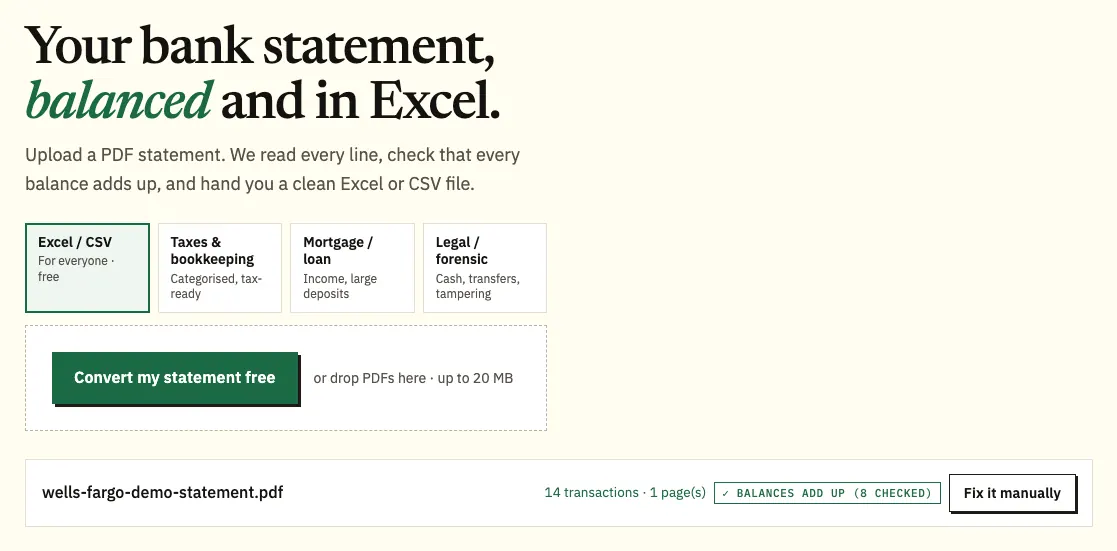
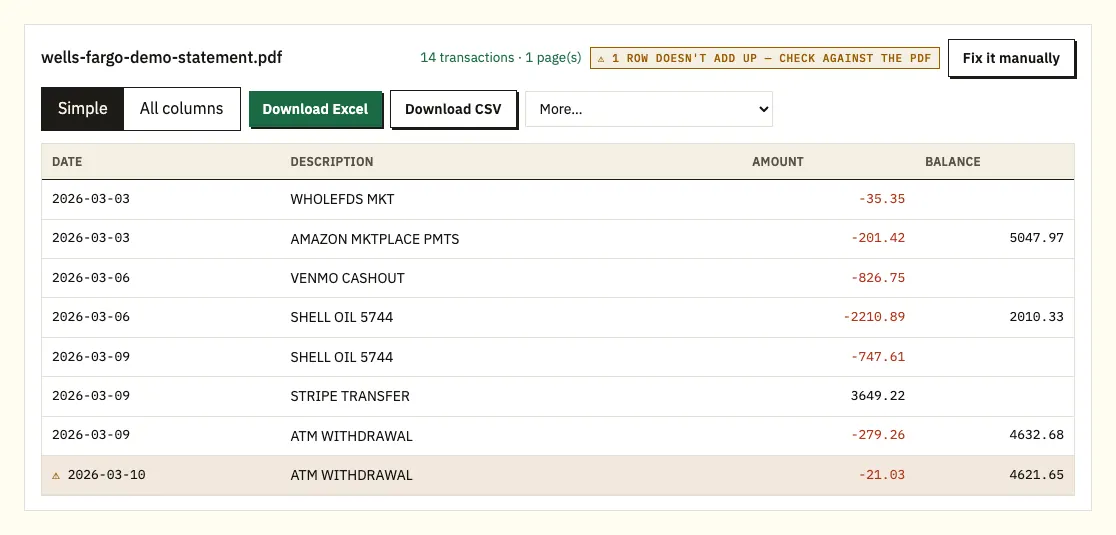
Uploading a demo Wells Fargo statement saved with a descriptive file name. - Compare the rows with the PDF; a ⚠ mark shows a balance that doesn't add up.
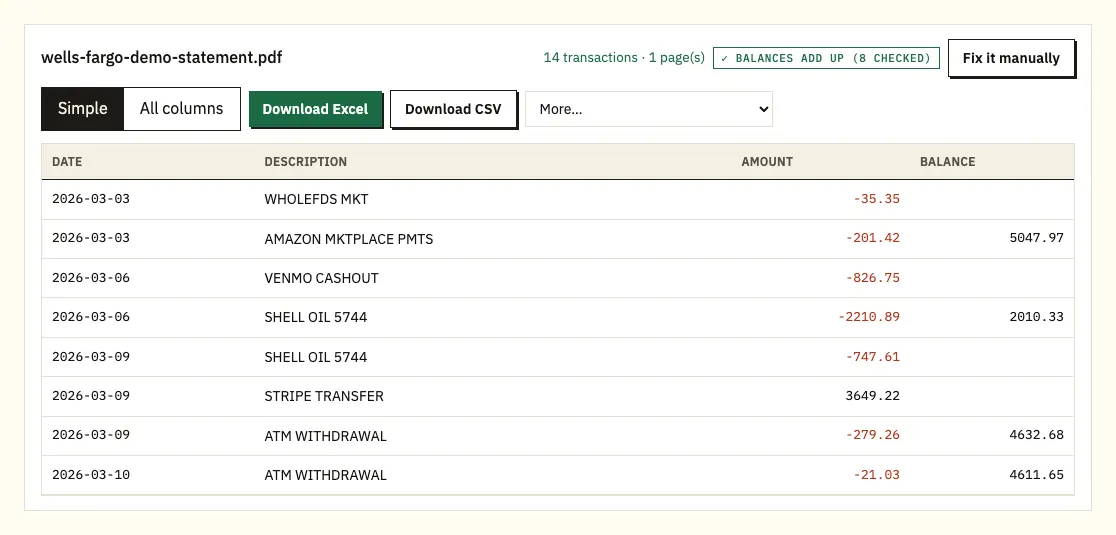
The preview, with each balance checked against the previous row. - Choose Download CSV, or Download Excel for an .xlsx workbook.
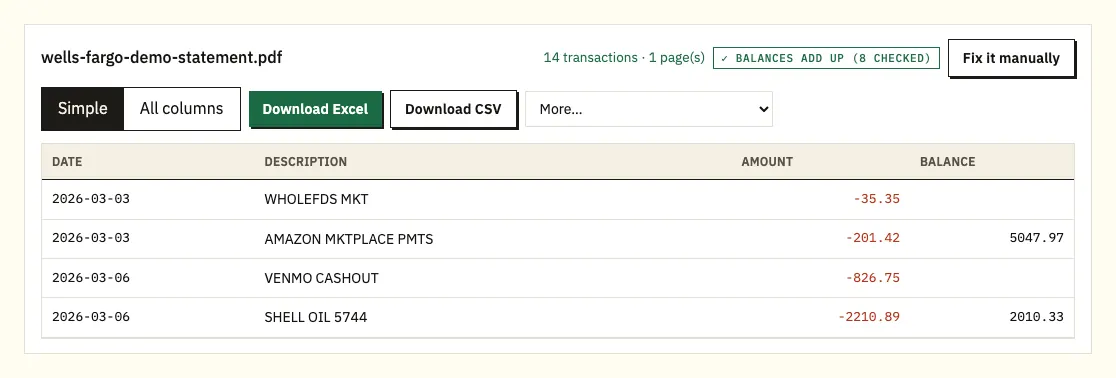
Download CSV or Excel. QuickBooks, OFX and QIF files are under More on paid plans.
Prefer to watch? This 1-minute video follows the same steps with a sample statement.
What to know about each Wells Fargo step
Wells Fargo lets you select only one statement at a time, so a year of statements means twelve downloads. Depending on your browser, the file may open in a new tab or go straight to your downloads folder. When you save it, Wells Fargo suggests keeping the .pdf extension and a name that says what it is, such as CheckingMarch2026.pdf. That habit pays off when you upload several months together.
The Wells Fargo Mobile app also lets you view online statements and documents. How you save the file depends on your phone, and Wells Fargo notes that printing may require signing on from a computer. Brokerage statements sit in a different place: Portfolio, then Statements & Docs in the Brokerage menu.
In the preview you see date, description, amount and, where the statement prints one, the balance. If balances appear next to the transactions, each one is checked against the row before. If the statement shows only a beginning and an ending balance, the check is whether the beginning balance plus all the amounts equals the ending one. Clicking a flagged row shows that line on the PDF page.
You can convert 3 pages a day without an account, or 15 with a free one. On the paid plans, the More menu adds QuickBooks (.qbo), OFX and QIF.
Download Account Activity or the statement PDF?
Not the statement, but you can download your account activity. In Wells Fargo Online, go to the Accounts tab and choose Download Account Activity. Pick the account, confirm the From and To dates, select Comma Delimited (ASCII, Spreadsheet) and choose Download. You can also pick Quicken Web Connect instead of the comma-delimited file.
By default the download covers the last 90 days. Some account types let you choose up to 18 months. Each account is a separate file, so give each one a different name. How far back activity shows online also depends on the account: up to 18 months for checking, savings and money market accounts, up to 24 months for lines of credit and installment loans, and for credit cards up to 90 days or 300 transactions.
Two things set the activity download apart from a statement. It covers the dates you type, not the statement cycle, and Account Activity includes pending transactions, which a statement never does. For a lender, a tax file or anything older than the activity window, work from the statement PDF.
| Download Account Activity | Converting the PDF statement | |
|---|---|---|
| How far back | 90 days by default, up to 18 months on some accounts | Any online statement: up to 7 years for checking |
| Formats | Comma Delimited (CSV), Quicken Web Connect | CSV and Excel; QBO, OFX and QIF on paid plans |
| Covers | The dates you choose, including pending items | The statement cycle, posted items only |
| Balances checked | No | Yes, against the printed balances |
| Accounts per file | One | Several PDFs merged, with a source column |
Parts of a Wells Fargo checking statement to check
Wells Fargo doesn't publish a sample statement on the help pages we checked, so look at the headings on your own PDF. Most checking statements follow the same order: account details and the statement period, a summary of balances, then the transactions.
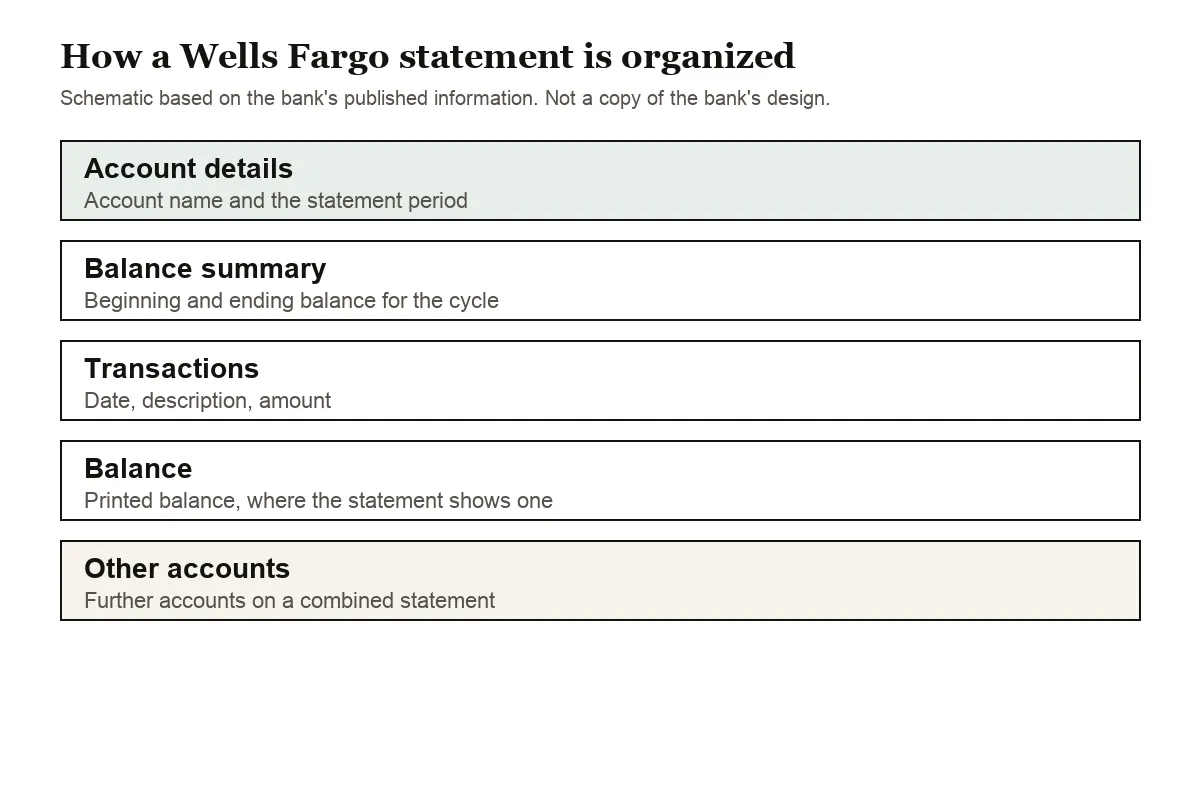
The parts worth knowing before you convert:
- The statement period. It runs from one cycle to the next, and Wells Fargo emails you when each cycle closes. Your CSV covers that period exactly.
- Combined statements. Customers with combined statements, and those with Prime or Premier Checking, get a statement that looks like the paper version, and it can hold more than one account. To combine checking and savings on one statement, Wells Fargo asks you to call 1-800-869-3557.
- The amount columns. Check whether your statement shows one amount column with minus signs or separate columns for money in and money out. The converter reads either and gives you one signed amount column.
- Balances. If a balance is printed after each day or transaction, it is used for the row-by-row check.
- Dates. If rows show only month and day, the year comes from the statement period.
Credit card statements use their own layout. When you convert one, purchases come out negative and payments positive, so the totals match what happened to your money.
Where Wells Fargo keeps older and closed-account statements
Wells Fargo keeps statement copies online for up to 7 years for checking and other deposit accounts, home mortgages and trust or managed investment accounts. Credit cards, home equity lines and personal loans keep up to 2 years, and auto loans up to 12 months. Online statements carry no charge.
After you close an account, online statements may stay available for about 90 days. Download what you need before then; after that, copies come through Customer Service at 1-800-869-3557. Check images from the past 18 months are viewable on the Account Activity page, while copies of check images in your statement may carry fees.
Reporting a wrong Wells Fargo debit card charge
A CSV makes it quick to sort by amount and find a repeat or unfamiliar charge. If a debit card charge looks wrong, Wells Fargo's debit card claims page lists the numbers to call and how to open a claim through Wells Fargo Online.
Wells Fargo PDFs worth double-checking
These are the cases that need a second look.
A balance that doesn't add up
When a printed balance doesn't equal the balance before it plus the transaction, the converter flags that row with ⚠. The usual causes are a missing page, a row that was copied twice or a PDF that was edited after Wells Fargo issued it. Click the flagged row to see it on the page, and download the statement again if pages are missing.
Several accounts in one PDF
A combined statement can list checking and savings in one file. Check the account name on each section and filter the CSV by account before you import it.
Descriptions on two lines
Long transfer and payroll descriptions can wrap. The second line is joined to the transaction above, so each one stays a single row.
A password on the PDF
If a PDF is locked, you're asked for the password once. It opens that file and isn't stored.
Scanned statements
Paper statements that were scanned or photographed are read with text recognition, which is less exact. Compare the totals with the paper copy.
Rows that don't match the activity download
If you compare a converted statement with a Download Account Activity file, expect differences. The activity file can include pending transactions and covers whatever dates you typed, while the statement lists posted items for one cycle. Match the two on the statement period dates before deciding a row is missing.
A year of statements in twelve files
Since Wells Fargo lets you select one statement at a time, a year arrives as twelve PDFs. Name each one by account and month as you save it, then upload them together. The spreadsheet adds a column naming the file each row came from, which makes a gap or a duplicate month easy to see.
Using a Wells Fargo CSV in QuickBooks, Xero or Sheets
CSV is the format most tools accept.
- QuickBooks: upload the CSV through bank upload, or use a QBO file on a paid plan. See importing into QuickBooks.
- Xero: import the CSV, or OFX on a paid plan, as a bank statement. See importing into Xero.
- Google Sheets: choose File, Import, Upload and pick the CSV.
Import a single month first to check that the date and amount columns map correctly.
What happens to a Wells Fargo PDF you upload
Uploads use an encrypted connection, and your file is used only for your conversion. It isn't shared. If you aren't signed in, the file and results are deleted after 24 hours. On a free account they're kept for 7 days, with an auto-delete switch and a delete button for any file. More on our security page.
Hold on to the original PDFs. The IRS page on how long to keep records explains which records to keep and for how long.
Wells Fargo tax documents and 1099s
Wells Fargo keeps tax forms beside your statements, under Statements and Docs, then Tax Documents, and you may not get a 1099 when the amount is under $10. For using a year of converted statements to check interest or support a return, see bank statements for your taxes.
Statement emails and delivery settings
Wells Fargo sends an automatic email when a new statement is available, so check that the email address in your online profile is current. To switch between paper and online statements, use Manage Delivery Preferences under Statements and Documents. Wells Fargo calls the online statement an official document with the same information as the paper version, and there is no charge for it.
Online statements are the easier source for conversion. A downloaded PDF has real text the converter can read exactly, while a paper statement has to be scanned first and is read with text recognition.
Common Wells Fargo statement and download questions
Can I export a Wells Fargo statement to Excel?
Wells Fargo gives statements as PDFs. Download Account Activity gives you a comma-delimited file you can open in Excel, for up to 18 months on some accounts. To get a spreadsheet of the statement itself, convert the PDF.
How far back can I see Wells Fargo statements?
Up to 7 years for checking and other deposit accounts, up to 2 years for credit cards, and up to 12 months for auto loans.
Why doesn't my CSV download match my statement?
Account Activity covers the dates you pick and includes pending transactions. A statement covers one cycle and lists posted transactions only, so the two rarely line up exactly.
Can I download several Wells Fargo statements at once?
Wells Fargo lets you select one statement at a time. Once you have the PDFs, you can upload them together and get one file with a column naming the statement each row came from.
What happens to my statements when I close the account?
Online statements may stay available for about 90 days after closing. After that, contact Customer Service for copies.
Does Wells Fargo charge for online statements?
No. Wells Fargo says online statements carry no charge and have the same information as the paper version. Copies of check images in your statement may carry fees.
How do I switch to online statements?
Go to Statements and Documents and choose Manage Delivery Preferences. Wells Fargo then emails you each time a new statement is ready.
Can I put checking and savings on one Wells Fargo statement?
Yes, Wells Fargo offers combined statements. To set one up, it asks you to call 1-800-869-3557. A combined PDF can still be converted in one go; check the account name on each section before you import.
Where are Wells Fargo brokerage statements?
Not under the banking statements. In Wells Fargo Online, go to Portfolio, then Statements & Docs in the Brokerage menu.
Other US bank guides
Banking somewhere else as well? See the guides for Chase statement to Excel, Bank of America statement to Excel, Capital One statement to Excel, Citi statement to Excel, U.S. Bank statement to Excel and PNC statement to Excel, or browse all supported banks.
When your PDFs are saved, turn each Wells Fargo statement to CSV with the bank statement converter (or the upload box at the top of this page). Wells Fargo's own online statements FAQ covers viewing, saving and retention.