
Capital One keeps up to seven years of checking and savings statements online, all as PDFs. To export a Capital One statement to Excel, save the PDF from view statements and upload it to our free bank statement converter, which gives you one row per transaction in date order.
Quick answer: Sign in at capitalone.com, open the account and click view statements (paperless statements must be on). Save the PDF, upload it in the box above, check the rows, then download Excel or CSV. The first 3 pages a day are free.
On this page
- How to export your Capital One statement to Excel
- Before and after the download: Capital One details
- Does Capital One offer a spreadsheet download?
- What a Capital One statement shows
- Capital One statements after you close an account
- Disputing a Capital One debit card charge
- Capital One PDF issues to check
- Capital One transactions in QuickBooks, Xero or Sheets
- Privacy when you upload a Capital One statement
- Capital One tax forms for checking and savings
- Capital One paperless and statement questions
- Guides for other US banks
How to export your Capital One statement to Excel
- At capitalone.com, sign in → click the account → view statements → save the PDF. In the app: account → scroll to the bottom → statements.
- Upload it here, in the box near the top of this page, or open the full bank statement converter.
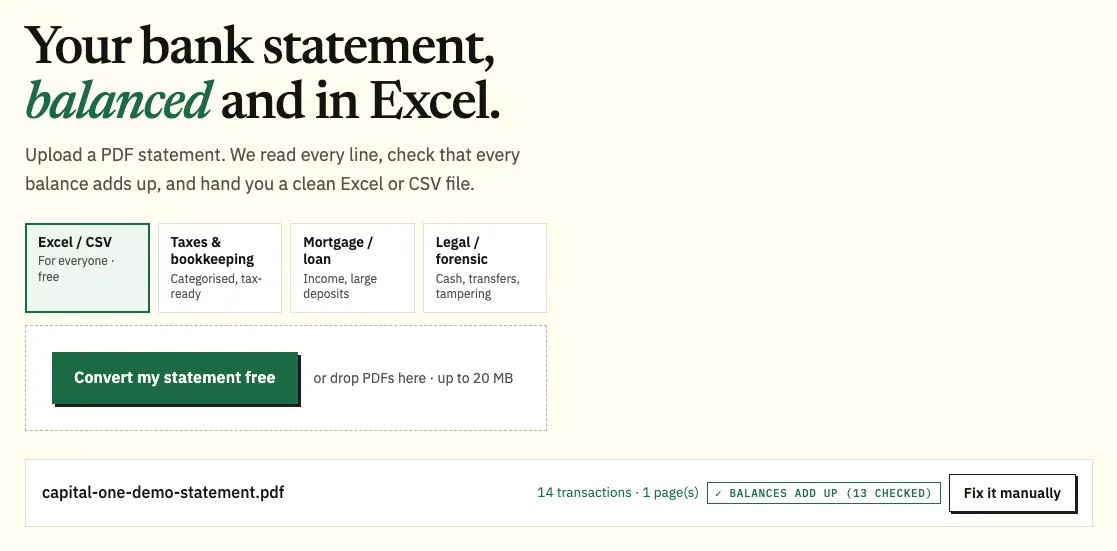
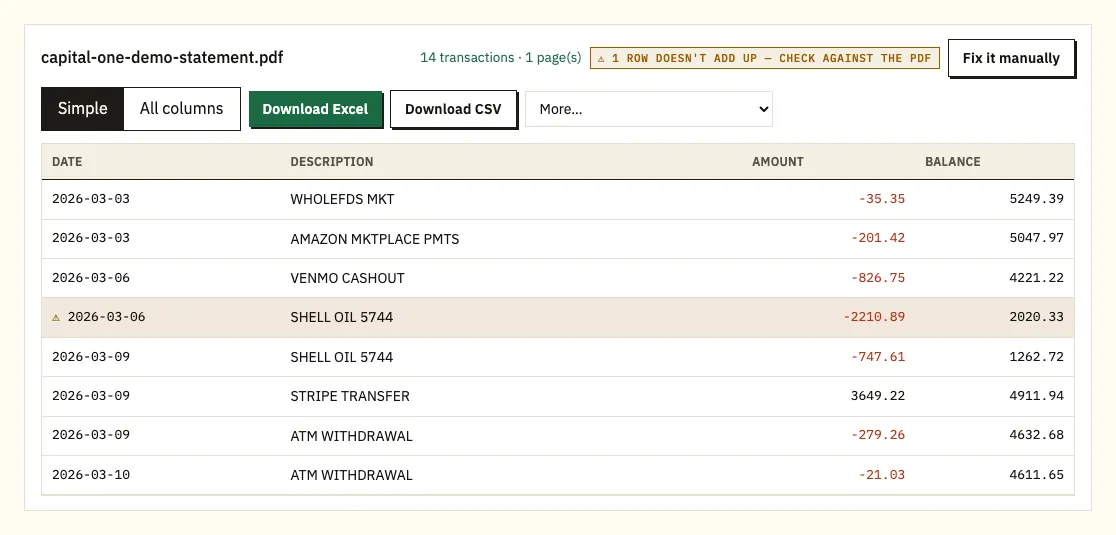
Uploading a demo Capital One statement. The file name appears with the result. - Review the balance check and any row marked ⚠.
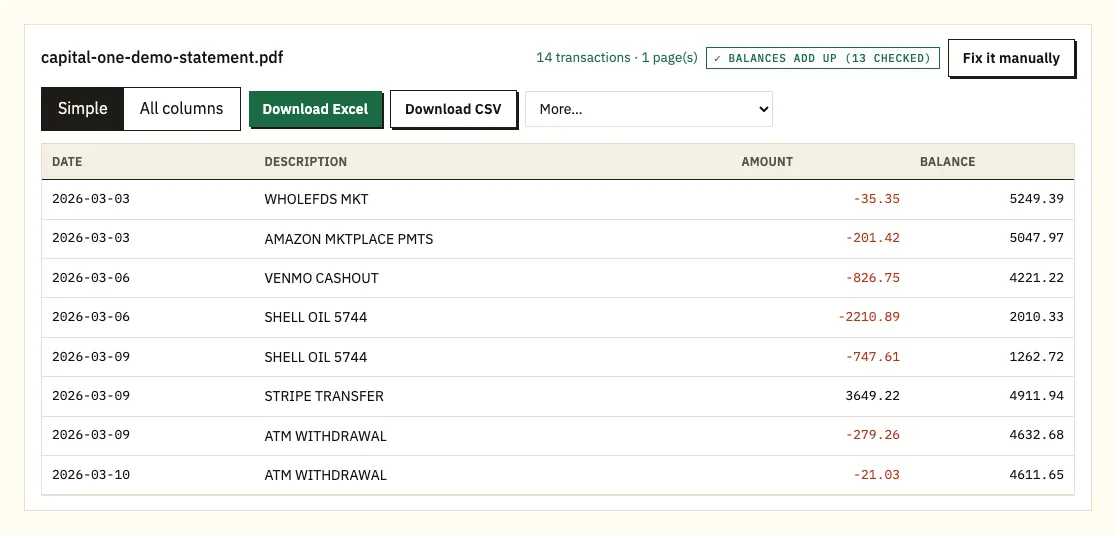
The preview, with the running balance checked row by row. - Download the Excel file, or CSV if you prefer.
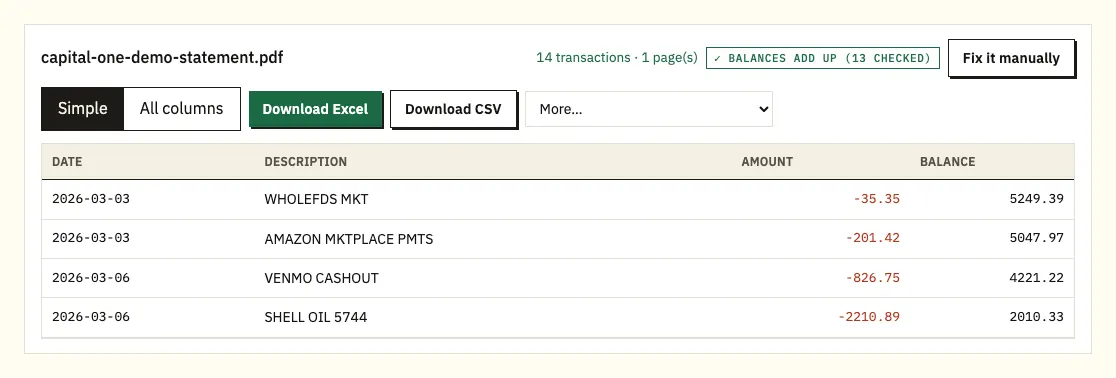
Download Excel or CSV. QuickBooks, OFX and QIF files are under More on paid plans.
Before and after the download: Capital One details
This guide covers Capital One checking and savings statements. Both the website and the app routes need paperless statements. If you still get paper, sign in on the website, open one of your active accounts, go to the account services and settings section and choose the paperless option. Capital One needs a valid email address on file before it can switch you over.
Timing is predictable. Capital One says bank statements are typically generated online by the 6th of each month. Savings accounts are the exception: when a month has no activity that would trigger a monthly statement, savings statements are generated quarterly instead.
Save the file Capital One gives you. A photo of the screen or a printout scanned back in is harder to read accurately than the original PDF.
In the converter, every transaction appears as a row with its date, description and amount. Where the statement prints a balance next to the transactions, each balance is compared with the one before it plus that row's amount. Where it prints only a starting and an ending balance, the converter adds every amount to the start and compares the result with the end. Click a flagged row to see the line on the PDF. You can convert 3 pages a day without an account and 15 with a free account; paid plans also offer QuickBooks (.qbo), OFX and QIF under More.
Does Capital One offer a spreadsheet download?
Capital One gives you two separate records online. The past transactions list shows the last two years of account activity on the website; in the app you tap the account, then view all beside the recent transactions header. Statements go further, with up to seven years of history for active accounts.
The Capital One help pages we checked describe viewing those transactions but don't describe a spreadsheet download for personal checking or savings. If your account shows a download option, it is the quickest route for recent activity. For a full statement period, for anything older than two years, or for a document a lender or accountant will compare with the bank's own record, the statement PDF is the one to use.
| Capital One past transactions list | Converting the PDF statement | |
|---|---|---|
| How far back | Two years on the website | Up to 7 years of statements for active accounts |
| Spreadsheet file | Not described on the help pages we checked | Excel and CSV; QBO, OFX and QIF on paid plans |
| Matches the statement period | No, it's a running list | Yes, row for row with the PDF |
| Balances checked | No | Yes, against the printed balances |
| Several accounts | One account at a time | Combined statements and several PDFs in one file |
What a Capital One statement shows
Capital One's own explainer on bank statements lists what a statement contains: your name, address and account number, the bank's contact details, the statement period, the starting and ending balances, deposits, withdrawals and transfers, and fees and interest earned. It also says layouts differ between paper and online versions, so compare this with the headings on your own PDF.
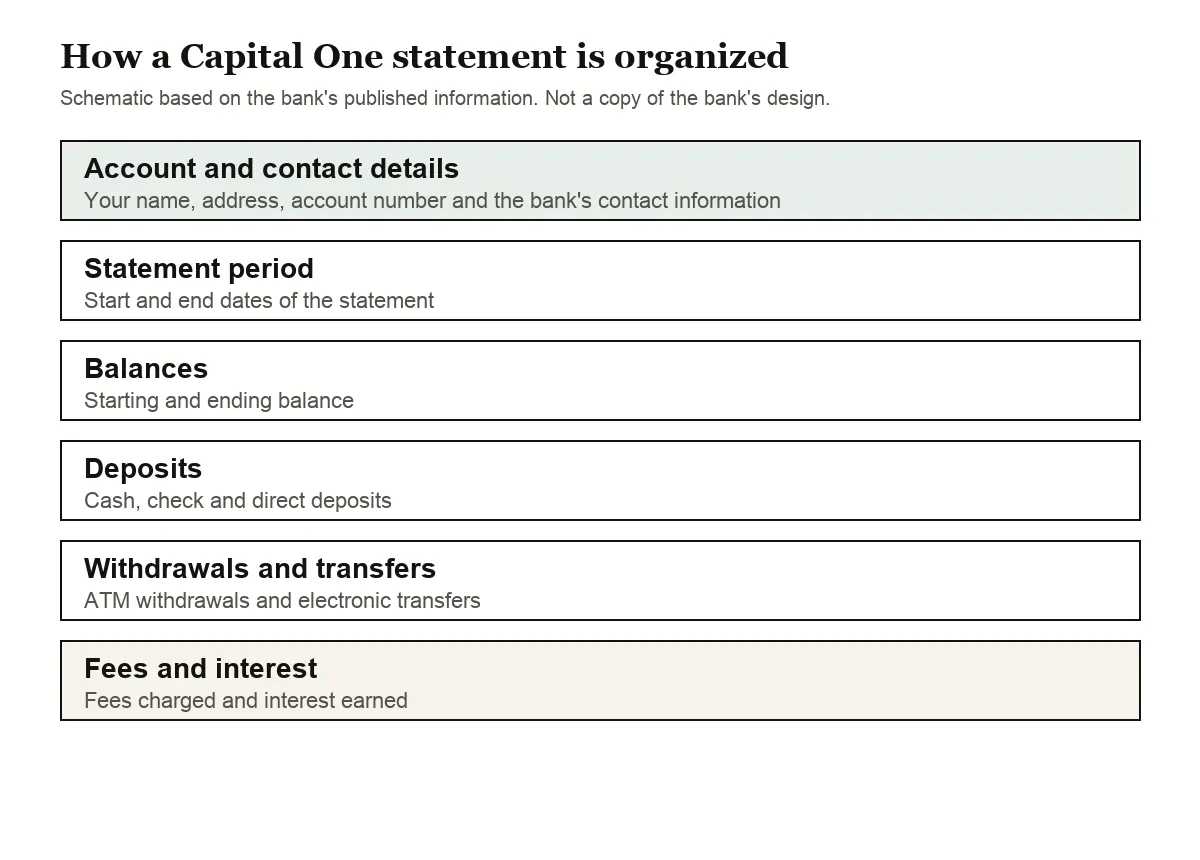
One Capital One detail changes how the PDF looks: direct accounts are automatically combined into one statement. If you have checking and savings, expect both on the same statement. When you convert, check which account each row belongs to before you import it anywhere.
Other things to look for on your statement:
- Interest. Savings and interest-bearing checking accounts show interest earned for the period. In the spreadsheet it is a positive row like any deposit.
- Fees. If a fee was charged, it appears as money out.
- Amount columns. Some statements use one column with minus signs, others separate money in and money out. The converter turns either into one signed amount column.
- Dates. If rows show only the month and day, the year is taken from the statement period.
Credit card statements use their own layout. When you convert a card statement, purchases come out negative and payments positive.
Capital One statements after you close an account
When you close a Capital One checking or savings account, it stays visible online for 105 days, and statements can be downloaded and printed during that time. Save every statement you might need for taxes, a loan application or your records before that window ends.
For paper copies of documents Capital One sent electronically, its electronic delivery notice gives two routes: write to Capital One at P.O. Box 360, Wilmington, DE 19899, or call 1-888-464-0727. Capital One says it may charge fees for paper copies, so ask about the cost when you call.
Disputing a Capital One debit card charge
Sorting the converted statement by amount or description makes a double charge or a forgotten subscription easy to see. Capital One asks you to file within 60 days after the statement showing the charge is sent, and its page on disputing a debit card charge has the steps and phone number.
Capital One PDF issues to check
A running balance that doesn't add up
If a printed balance doesn't equal the previous balance plus the transaction, the converter flags the row with ⚠. A missing page, a duplicated row or an edited PDF are the usual reasons. Click the row to check it against the PDF, and download a fresh copy from Capital One if something is missing.
Two accounts on one statement
Because direct accounts are combined, one PDF can hold checking and savings. Filter by account in the spreadsheet so a transfer between them isn't counted twice.
Long descriptions
Transfer and payment descriptions sometimes wrap onto a second line. That line is joined to the transaction above, so you keep one row per payment.
Password-protected or scanned files
A locked PDF asks for its password once, and the password isn't stored. A scanned paper statement is read with text recognition, so compare its totals with the paper copy.
A savings statement that covers three months
When a savings account has no activity that would trigger a monthly statement, Capital One generates a quarterly one instead. The converted file then spans three months, and a monthly report built from it needs the rows split by date. If rows show only the month and day, the year still comes from the statement period printed on the PDF.
Paper and online statements that look different
Capital One says layouts differ between paper and online versions. Both carry the same kinds of information, but the online PDF converts more exactly because its text is real text. A paper statement has to be scanned and read with text recognition, so use the online copy when you have one.
Last month's statement isn't there yet
Bank statements are typically generated online by the 6th of each month. If you're closing out a month in your books on the 1st, wait a few days for the statement rather than working from the transactions list, which isn't tied to the statement period.
Capital One transactions in QuickBooks, Xero or Sheets
- QuickBooks: upload the CSV, or a QBO file on a paid plan, through bank upload. See importing into QuickBooks.
- Xero: import the CSV or OFX file as a bank statement. See importing into Xero.
- Google Sheets: choose File, Import, Upload and select the CSV.
With a combined statement, split checking and savings into separate files first, since each one is a separate bank account in your books.
Privacy when you upload a Capital One statement
The upload is encrypted, and the file is used only to convert it for you. Nobody else is given it. Files from visitors who aren't signed in are deleted after 24 hours; on a free account they're kept for 7 days, and you can turn on auto-delete or delete them sooner. See our security page.
Keep the PDFs themselves too, especially from an account you're about to close. The IRS explains how long to keep tax records.
Capital One tax forms for checking and savings
Capital One sends a 1099-INT when it paid a combined $10 or more in interest across all your deposit accounts, closed ones included, so the form can be higher than the interest on the account you still use. Our guide to preparing bank statements for taxes shows how to total interest rows from a year of converted statements to see where the figure comes from.
Capital One paperless and statement questions
Why can't I see my Capital One statements online?
Online statements require paperless enrollment. Turn it on from the account services and settings section, with a valid email address on file.
How far back do Capital One statements go?
Up to seven years for active accounts. The past transactions list covers two years.
When is my Capital One statement ready?
Bank statements are typically generated online by the 6th of each month. A savings account with no qualifying activity gets a quarterly statement instead.
Can I get statements after closing my account?
Yes, for 105 days after closing, when the account stays visible online. After that, ask Capital One for paper copies, which may carry a fee.
Why are checking and savings on the same statement?
Capital One combines direct accounts into one statement automatically, so checking and savings arrive in the same PDF.
Can I convert a Capital One credit card statement?
Yes. Upload the card statement PDF the same way. Purchases are negative and payments positive.
How do I get a paper copy of a Capital One statement?
Capital One's electronic delivery notice says you can write to P.O. Box 360, Wilmington, DE 19899, or call 1-888-464-0727. It may charge a fee for paper copies, so ask about the cost first.
Does the spreadsheet show interest earned?
Yes, when the statement prints it. Interest earned on savings or interest-bearing checking comes through as a positive row, the same way a deposit does.
Guides for other US banks
Using another bank too? See the guides for Chase statement to Excel, Bank of America statement to Excel, Wells Fargo statement to CSV, Citi statement to Excel, American Express statement to Excel and Truist statement to Excel, or browse all supported banks.
To export a Capital One statement to Excel, save the PDF and open the bank statement converter (or the upload box at the top of this page). Capital One's help page explains how to view your online statements.